







Chapter 3
How to analyze and report AI-moderated research findings
TL;DR
AI‑moderated interviews turn raw conversations into transcripts, themes, and reports. Researchers use that foundation to check AI output against conversations, correct gaps or bias, and decide which insights should influence product decisions.
Maze AI moderator runs and summarizes user interviews, turning each session into transcripts, highlights, themes, sentiment, and an editable report. Researchers then balance AI with human judgment—reviewing sessions, refining themes, and closing gaps or bias to produce stakeholder‑ready insights and actionable product decisions.
AI‑moderated interviews can collect feedback at scale very fast. But the summaries and themes it generates still need human judgment. After all, only researchers decide which insights should shape a product decision.
This chapter focuses on that human layer of the workflow. We look at how to review AI‑moderated interviews, validate AI‑generated findings against the raw data, and spot gaps or bias in the analysis.
You’ll learn how to turn real-time AI output into reliable qualitative research by checking how the automation has interpreted your interviews, correcting its gaps or bias, and deciding which insights deserve to shape product decisions.
Typical outputs from AI-moderated research: What to expect
AI‑moderated interviews turn many individual conversations into a set of structured outputs you can scan and share quickly.
At a minimum, most tools will give you:
- Full transcripts and recordings: A text record of every interview, often with time stamps and speaker turns, sometimes paired with audio or video. This is your raw data and the source you can always go back to.
- Per‑interview summaries: Short overviews of what each participant said—their goals, main frustrations, key quotes, and any notable behaviors or attitudes.
On top of that, AI usually adds a layer of automated analysis across all interviews:
- Themes and topic clusters: Grouped patterns like ‘onboarding confusion,’ ‘dashboard performance,’ or ‘pricing clarity,’ often with frequency counts and representative quotes
- Sentiment and signals: High‑level views of how positive, neutral, or negative participants felt about certain features or journeys
- Highlight reels or insight summaries: Narrative summaries, slides, or dashboards that pull the main findings into a format you can show to stakeholders
Maze AI includes all of those core outputs, plus a few extra layers to make analysis and reporting easier:
- Complete transcripts: Maze creates a transcript for every AI‑moderated interview. Transcripts are time‑stamped and speaker‑labeled, so you can scan and search conversations and copy verbatim quotes straight into your report.
- Session summaries: After each session, Maze generates a short summary of what the respondent said. These summaries surface key topics and reactions so you are not starting analysis from a blank page.
- AI‑generated highlights and tags: Maze flags important moments in the transcript, such as strong reactions, pain points, or feature requests. These highlights often include tags that describe what is happening in that clip, which makes it faster to group similar feedback later.
- Thematic analysis across sessions: Maze groups related feedback into themes once you have enough completed interviews. For each theme, you see a short description, supporting quotes, and a confidence signal that shows how strong the pattern looks in your data.
- Sentiment and tone signals: In some Maze views, you also see sentiment or tone layered on top of transcripts and themes. This gives a quick read on whether people feel positive, neutral, or negative about a topic before you dive deeper.
- Study‑level summaries and reports: When enough data is in, Maze creates a higher‑level summary of the whole AI‑moderated study. This appears as an editable report with key findings, themes, and example quotes that you can adjust before sharing with stakeholders.
How to review and validate AI‑generated themes and findings
AI‑moderated tools can turn many interviews into themes and summaries fast—but those are still first drafts. Researchers need to review and validate AI‑generated findings against the raw data to ensure they’re accurate, unbiased, and strong enough to inform decisions.
Begin with a quick pass over the raw interviews
This first pass helps you hear how people talk about your product or problem, spot any obvious transcription issues, and get a gut feel for the data.
Pick a handful of sessions across different participant types and scan for recurring phrases, strong reactions, and surprising comments. As you read, jot down quick notes or impressions (for example, 'onboarding confusion shows up a lot' or ‘pricing feels excessive’) so you can later compare your own sense of the data with what the AI says.
This quick familiarization step makes it much easier to judge whether AI‑generated themes are accurate, too generic, or missing something important. This gives you a mental picture of the raw conversations they’re built on.
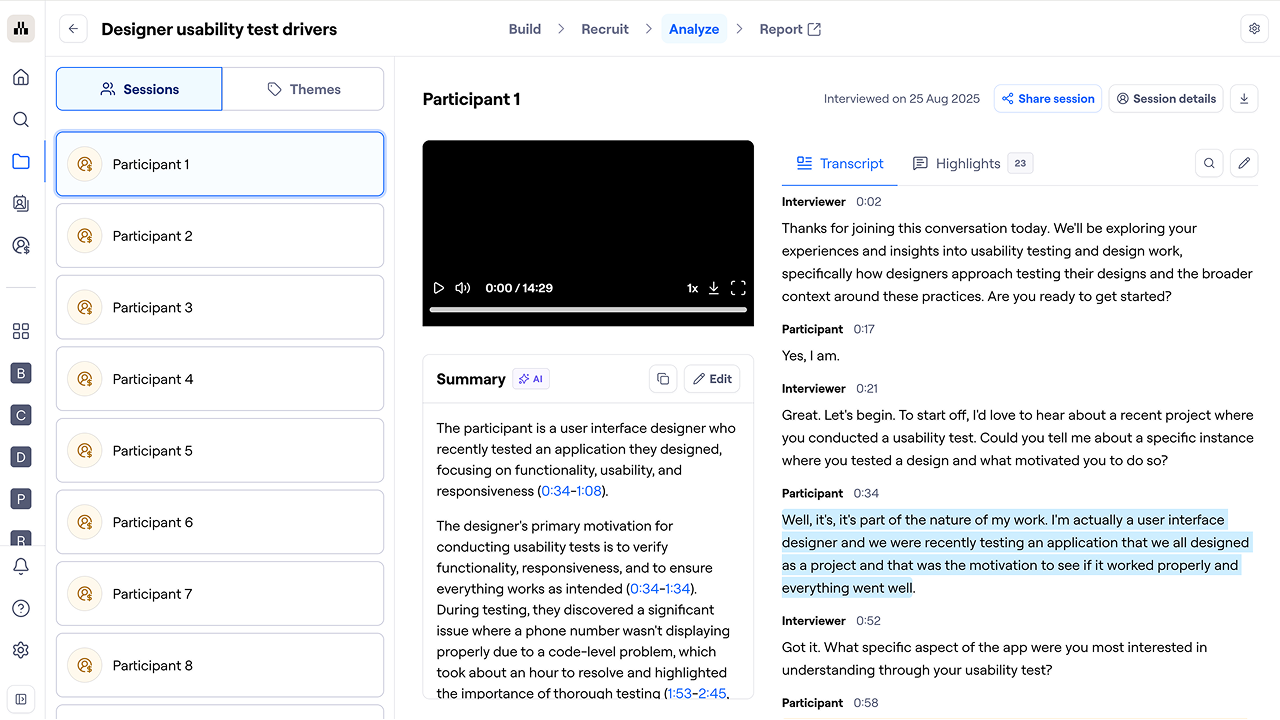
In Maze, the ‘Sessions’ tab is your first stop after your AI-moderated research collects responses. This is where you can see each participant's recording, transcript, AI‑generated summary, and automatically generated highlights all in one place.
If you spot an important quote or exchange that wasn't highlighted, add it manually. You can also create a highlight reel for individual sessions by adding highlights directly from this view.

Audit AI‑generated themes against the evidence
Once you’ve skimmed some raw interviews, the next step is to treat AI‑generated themes as hypotheses and check them against what participants said.
For every major theme, ask three basic questions as you review the underlying data:
- Does the label match the quotes? Check whether the wording of the theme reflects how participants describe the issue or if it’s too generic or slightly off
- Are the examples strong and varied? Look for several clear, specific quotes and make sure they come from more than a single participant or session
- Is anything fabricated or misattributed? Verify that highlighted quotes appear in the transcript and belong to the right person, removing anything that seems invented or taken out of context
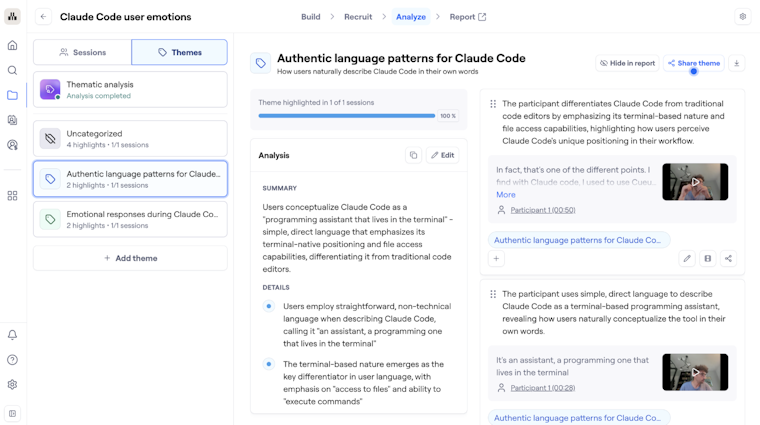
In Maze, you can do this from the ‘Themes’ tab. This is where Maze AI clusters highlights from all your AI-moderated interviews into themes so you can see patterns across respondents instead of session by session.
If you collect more sessions after running the analysis, you can re-run it in an iterative way. Choose ‘Analyze X new sessions’ to build on existing themes, or ‘Start from scratch with AI’ if you want a fresh pass without your previous themes influencing the synthesis.
You can also edit theme summaries and key findings directly from this view. Any changes you make here automatically update in your report, so your final output reflects your judgment.

Identify gaps, bias, and weak signals
Once you’ve checked that AI themes match the underlying quotes, take a step back and ask what the analysis might be missing :
- Gaps: Look across your themes and ask “What important topic isn’t showing up here?” or “Which user groups barely appear?” For example, you might see lots of feedback from power users, but almost nothing from new users—even though you interviewed both. That’s a sign to go back to those sessions and make sure their perspectives are represented.
- Bias: Scan how themes are framed and prioritized. Are some experiences consistently described as ‘edge cases’ when they affect a particular region or demographic more heavily? Is the AI overweighting what the loudest or most talkative participants said? Note these patterns and, if needed, rephrase themes or rebalance how prominently they appear in your findings.
- Weak signals: Flag themes that are based on very few interviews or vague, low‑detail quotes. Instead of deleting them, label them as ‘early signals’ or ‘questions for future research,’ so stakeholders understand they’re hypotheses to explore.
In Maze, not every highlight gets placed into a theme automatically. Click ‘Uncategorized’ in the left sidebar to see all highlights that Maze AI didn't assign to a theme.
For each uncategorized highlight, decide if it belongs to an existing theme or represents a new pattern worth creating a theme for. To assign it, click ‘Edit highlight’, select a theme from the dropdown, and save.

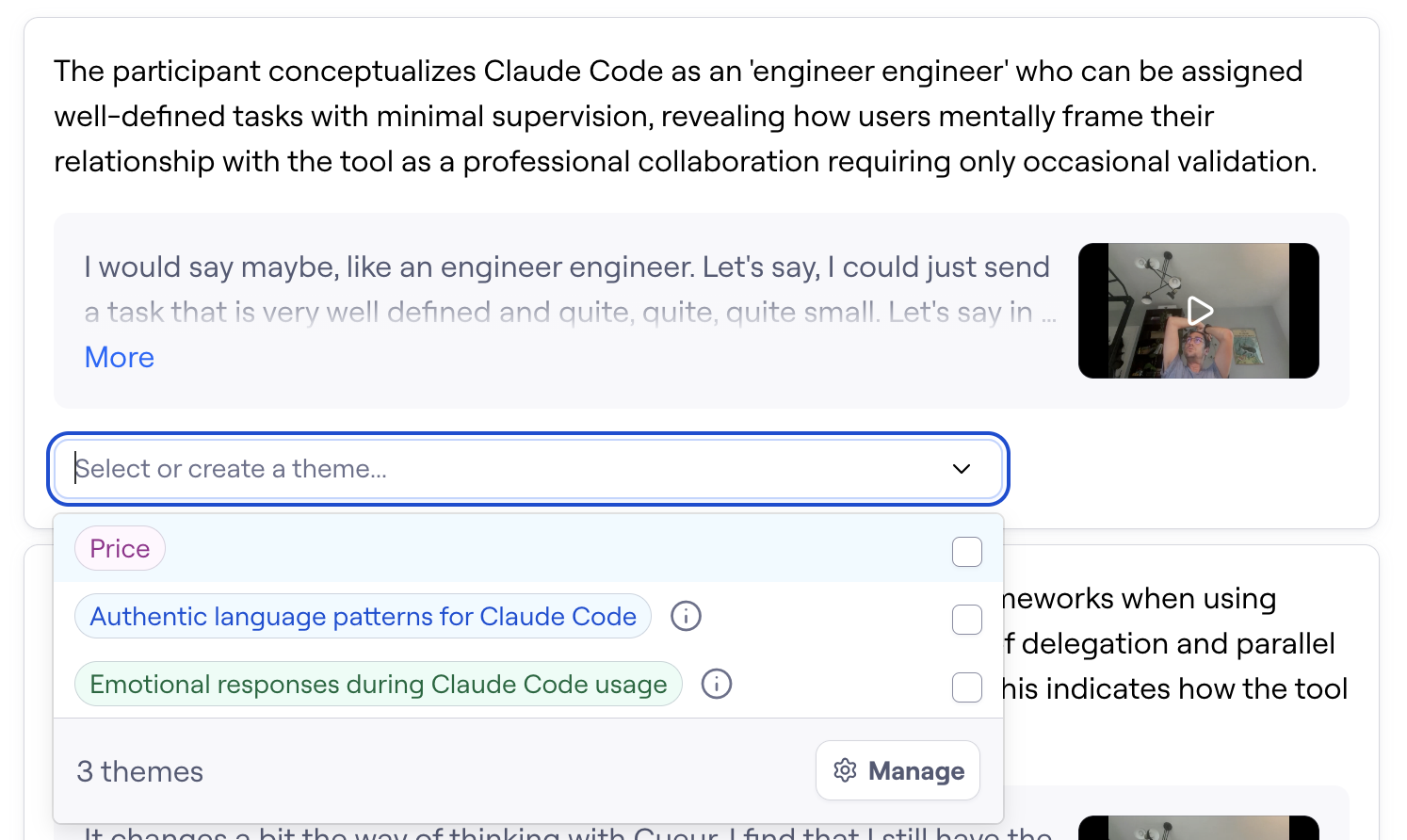
Also check the highlights inside existing themes. If something feels off—a quote that doesn't match the theme it was placed in—edit the highlight and move it to a more accurate theme. This kind of human review keeps your AI-moderated research findings trustworthy and high-quality.
Clean up themes in your AI-powered reports
After you’ve reviewed AI themes and checked them against the raw interviews, the final step is to tidy them up in the report your stakeholders will see.
Start by renaming and simplifying themes so they use plain, user‑friendly language and avoid overlap. If two themes describe almost the same issue, merge them into one, broader theme and move all supporting quotes under it. Then reorder themes so the most important, decision‑shaping findings come first, and weak signals are clearly marked as such or moved into a separate section.
Next, trim and polish the AI‑generated text in your report. Remove generic phrasing, repeated points, or unclear sentences, and replace them with short, specific descriptions backed by one or two sharp quotes. Make sure each theme answers a simple question ("What is happening?" and "Why does it matter?") and that the overall report flows logically from user context to key findings to implications.
Maze AI often labels themes accurately, but the language may not match how your research team or stakeholders talk about the problem.
A few more things to do in this step:
- Merge overlapping themes: If two themes describe the same issue in different words, combine them into one clear finding
- Hide themes you don't need: Use the ‘Hide in report’ option for themes that aren't relevant to your current research goals or stakeholders
- Pin the most important highlights: Pinned highlights stay front and center in each theme, so your strongest evidence is always visible
This clean-up step is what turns Maze's AI research reporting into a set of high-quality, research-grade customer insights.
From themes to insights: Adding the human layer
AI‑moderated research tools can help find recurring themes or patterns in what participants say across many interviews. A theme describes what people talk about in aggregate, such as ‘participants hesitate at checkout’ or ‘teams find scheduling interviews time‑consuming.’
Researchers then take those themes and turn them into insights. An insight explains why a pattern is happening and why it matters for the product or business. For example, “because checkout feels risky, people abandon purchases when payment options are unclear, which limits revenue from new customers.”
But not every theme needs to become a fully developed insight. Researchers decide which themes warrant interpretation by looking at factors like:
- How serious the problem is for users
- How often it appears across interviews
- How closely it links to important journeys or business goals
This way, the final themes reflect a balance of both AI and human judgment. Instead of relying on AI alone or starting from a blank page, researchers get structured patterns to work with—and still make the final calls on what those patterns mean for the product.
Reporting and sharing findings with stakeholders
Validated themes are only useful if the right people can see and act on them.
- Start with goals and context: Begin every report with a short recap of why you ran the study, the main questions, and who you spoke to. This anchors AI‑generated findings in a concrete decision space.
- Show the main findings, not every theme: Select a small set of themes that matter most for upcoming decisions and list them as key findings. For each one, answer three things: what’s happening, why it matters for users or the business, and which journeys or features it touches.
- Lead with clear evidence: Under each finding, add one or two quotes, a short clip, or simple counts like ‘12 of 18 sessions.’ This gives stakeholders something concrete to react to, rather than asking them to trust an AI summary on its own.
- Explain the role of AI: Keep your AI explanation to a few simple lines, like "AI handled transcripts and grouped similar answers; we reviewed those themes, fixed issues, and chose what to share." This keeps the workflow transparent.
- Tailor the story to the audience: For research and product teams, include more detail on user flows, edge cases, and constraints. For leadership, keep the story concise, connect each finding to goals or metrics, and end with a clear recommendation and next steps.
How Maze helps with analyzing AI-moderated research
Maze streamlines the analysis of AI‑moderated interviews by turning raw conversations into transcripts, themes, and stakeholder‑ready reports you can review, edit, and share.
1. Session-level analysis: transcripts, summaries, and clips
After an AI‑moderated study finishes, Maze generates an editable transcript with speaker labels, an AI‑generated session summary, and timestamped highlights of key moments. You can scan these sessions, add or adjust highlights, and export individual clips or highlight reels to use in presentations or research readouts.
2. Cross‑session thematic analysis with evidence attached
Maze’s thematic analysis engine reviews across all your interviews to cluster related feedback into themes, tag sentiment (positive, neutral, negative), and link every theme back to specific supporting quotes and sessions.
You can see a confidence level based on how many sessions you have: low for 1–4 sessions, medium for 5–9, and high for 10 or more. You can run analysis before you hit the recommended number, but more sessions mean more reliable themes.
3. Stakeholder‑ready, editable reports
Maze automatically generates a user research report for every AI-moderated study that has at least one added highlight, so you're never starting from a blank slate. This is one of the biggest advantages of using AI tools for user research.
Click the ‘Report’ tab to access it. The report starts with an executive summary, followed by individual theme slides showing highlights, summaries, and key findings.
The report is fully editable. You can update theme summaries, rewrite key findings, and hide themes that aren't relevant to the decision your stakeholders need to make. Think about who will read this report.
For example, a UX research or product team needs findings tied to specific user experience decisions, while a leadership team needs a short, clear story with a recommendation. Tailor the language to match what your audience will do with the customer insights.
When you’re ready, click ‘Share report’ to copy a link. You can share it as public or private, embed it in tools like FigJam or Notion, or share individual themes, highlights, and sessions separately.
So while Maze transcribes interviews, organizes feedback into themes, generates summaries, and drafts reports, researchers use that foundation to check AI output against conversations, correct gaps or bias, and decide which insights should influence product decisions.
AI-moderated research helps you get the insights you need
AI moderation can reduce hours of analysis by generating transcripts, summaries, themes, sentiment signals, and draft reports. But the value of AI-moderated research shows up well before you begin analysis.
From drafting studies and questions to interviewing users 24/7, AI-moderated research is helping teams uncover key insights faster than ever before. With the support of human researchers, it’s a great way to speed up research and product development.
Maze AI Moderator brings the entire product lifecycle into one connected workflow, so teams can run interviews, analyze responses, and share stakeholder-ready insights. It’s fast and reliable, and still keeps humans in control. Just how it should be.



Frequently asked questions about AI-moderated research analysis
How accurate are AI-generated themes from user research sessions?
How accurate are AI-generated themes from user research sessions?
AI-generated themes are a good starting point. They quickly identify common topics, pain points, and sentiment across many sessions. However, they’re not a replacement for human judgment. Researchers should always review the themes, merge or split them where needed, and confirm that they accurately reflect what participants said before using them to guide product decisions.
How do I know which AI-generated insights to trust?
How do I know which AI-generated insights to trust?
You can trust AI-generated insights when:
- It’s backed by enough data, not just one or two users
- You see the same pattern in multiple sessions or tasks
- You can trace to quotes, clips, or observations that support the claim
How should I present AI-moderated findings to stakeholders who are skeptical of AI?
How should I present AI-moderated findings to stakeholders who are skeptical of AI?
To present AI‑moderated findings to skeptical stakeholders, follow these quick practices:
- Start with the basics: Share your research goals, your participants, and how many sessions you ran
- Describe AI’s role simply: Explain that AI helped with transcription and grouping similar answers but did not make decisions for the team
- Describe your role clearly: Explain that you reviewed the themes, checked them against transcripts, and chose which findings to share
- Lead with proof: Show short quotes, clips, and simple counts like “this pattern appears in 12 of 18 sessions,” instead of only an AI summary
- Close by stressing human judgment: Make it clear that AI streamlined a time‑consuming part of the research process, while people on the research team shaped the conclusions
Can I export Maze findings into other research tools?
Can I export Maze findings into other research tools?
Yes! You can download session transcripts, export recordings, share individual highlights or themes via link, and embed reports into tools like FigJam or Notion. Highlight reels can also be downloaded as video files to use in presentations.
How long does analysis take after an AI-moderated study?
How long does analysis take after an AI-moderated study?
Transcripts, summaries, and draft themes are typically ready within minutes of sessions finishing. Thematic analysis typically takes a few minutes depending on the number of sessions. In Maze, you can access results as soon as the first session is complete and re-run the analysis as more respondents complete the AI-moderated study. Human review time depends on the size and complexity of your research, but having AI handle the first-pass synthesis means the time-consuming part of qualitative analysis is already done.