







Chapter 2
How to run AI-moderated interviews: A step-by-step guide
TL;DR
AI-moderated interviews help teams run structured, conversational user research at scale. In Maze, you can create a study, define research goals, recruit participants, pilot the flow, and launch interviews that collect rich user insights without relying on human moderators for every session. This approach makes large-scale qualitative research easier to manage while keeping human researchers in control of the setup, review, and final decisions.
AI-moderated interviews help teams collect rich, conversational feedback without manually running every session.
But the quality of your results depends on how well you set up the study. In this chapter, we look at the steps to run an AI-moderated interview workflow in Maze, including how to:
- Create a new AI-moderated study
- Define research goals and discussion settings
- Recruit the right participants
- Run a pilot before scaling
- Launch your study and start collecting responses
Here’s how to set up your AI-moderated study from start to finish.
Want to refresh your knowledge of AI-moderated research? We look at what AI moderation is, when it’s a good fit, and what makes it research-grade in Chapter 1 of this guide.
How to run AI-moderated interviews in 5 steps
Running AI‑moderated interviews follows the same core logic and methodology as any good qualitative research. You still define the goal, design the guide, recruit participants, run sessions, and synthesize insights.
The difference is that an AI moderator handles the live conversation while you are in control of the setup and review. Unlike a general-purpose chatbot, it follows the goals, questions, and probing rules you provide. This makes it possible to run live interviews without assigning a moderator to every session.
Step 1: Define research questions and goals
Research goals as short statements that describe what you want to understand, like “Understand why new users drop off after signup” or “Learn how teams currently run user interviews.”
Research questions then break those goals into specific, answerable questions, such as “What do users find confusing in the onboarding flow?” or “Which part of the interview process feels most time‑consuming today?”
Once you’ve outlined a few clear research goals and turned them into specific questions, you’re ready to set them up for your AI-moderated study.
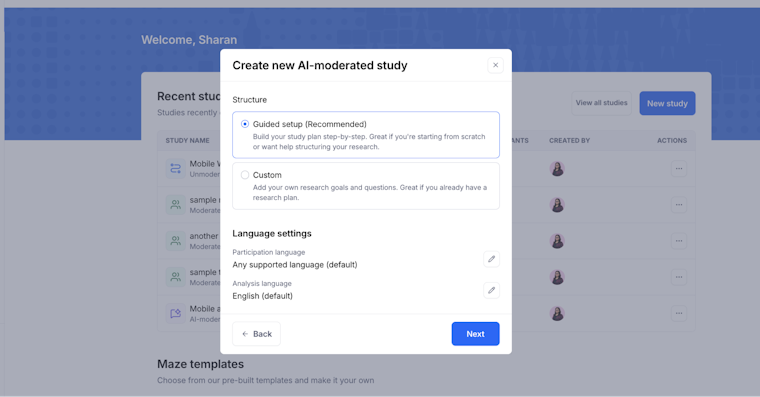
Log in to your Maze account, or sign up if you haven’t created one yet. From your workspace, create a new project (or open an existing one), click ‘New study’, then select ‘AI‑moderated study,’ and give it a name your team will recognize.
You’ll see two options for how to set it up:
- Guided setup (recommended): This option leads you through your study step by step, helping you define research goals, generate structured research objectives, and build a discussion guide with suggested questions and follow-ups.
- Custom: This option starts from a blank structure so you can add your own objectives, questions, and configuration, which works best if you already have a research plan and just need the AI moderator to run and analyze the conversations.

Here, you’ll need to turn your brief into a short list of specific research goals first.
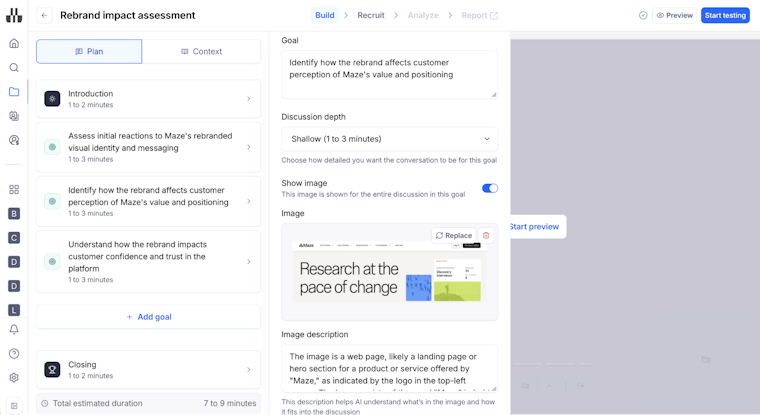
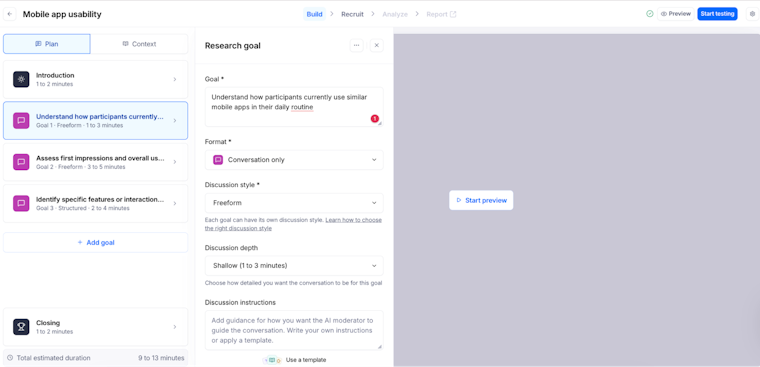
- Add your research goal: In the goal field, describe what you want to learn in one clear sentence, such as how people use a feature or react to a concept.
- Choose the format: Use the ‘Format’ dropdown to pick how participants will experience this goal:
- Conversation only for talking through a topic without any stimulus
- Conversation with image to show a screen or idea for concept testing
- Conversation with link to explore a website or prototype

Step 2: Set up a discussion guide
A discussion guide is the outline that keeps your interview focused on what matters. Start by turning your goals and research questions into a simple structure:
- Introduction and context: Briefly explain why you’re running the study and what participants can expect
- Warm‑up questions: Easy, open questions that help people relax and start talking about their role or context
- Core questions and probes: The main questions that map directly to your research goals, with follow‑up prompts like “Can you tell me more?” or “What made that difficult?”
- Closing: Thank participants, give them a chance to add anything else, and explain next steps if relevant
You can also add simple rules or branches to your guide (for example, “If they mention onboarding, ask these follow‑ups”) so the AI can adapt the conversation while still following your structure.
In Maze, you can pick a discussion style by choosing ‘Structured’ or ‘Freeform’. Structured keeps questions in a fixed order for comparability, while Freeform lets the AI moderator adapt to the flow of the conversation.
Next, you need to set ‘Discussion depth’ to decide how long the AI should stay on this goal. For example:
- Shallow (1–3 minutes)
- Moderate (3–5 minutes)
- Deep (7–9 minutes)
Then add discussion instructions. Here, you tell the AI moderator how to guide the conversation for this goal. You can write your own guidance or select a template to get started quickly.

💡 Wondering how far you can push AI‑moderated interviews for evaluative research? Read more about Maze’s AI moderator here.
Step 3: Recruit the right participants
Recruiting the right participants means finding people who match your target users, so the insights you collect are relevant to the user experience you’re studying.
Start by defining who you want to talk to:
- Role or segment (for example, product managers, new customers, power users)
- Key behaviors (for example, ‘signed up in the last 30 days,’ ‘runs regular user interviews’)
- Any exclusions (for example, ‘not internal teammates,’ ‘not agency partners’)
Then choose your recruitment channels, such as your product’s user base, email lists, social media, or external panels and tools. For market research, external panels can help you reach people beyond your existing customer base.
If you’re using Maze, go to the ‘Recruit’ tab to decide who should take part in your AI‑moderated interviews. You can either share a ‘study link’ through your own channels or create an order with panel participants to reach a targeted audience from Maze panel.

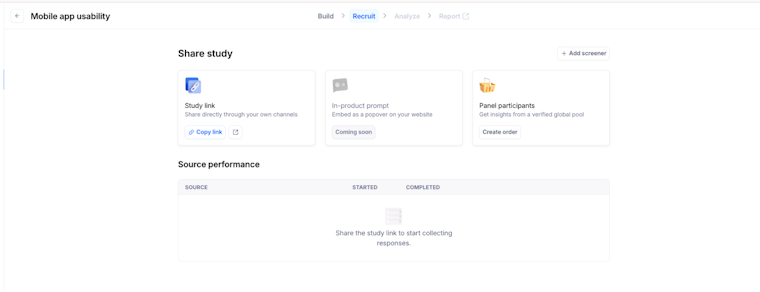
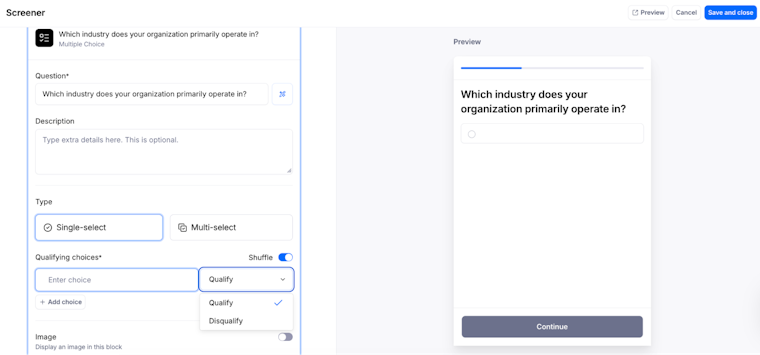
If you’re using panel participants, add a screener so only the right people qualify for your study. Click ‘Add screener’, then set up one or more multiple-choice questions, choose single-select or multi-select, and mark which choices qualify or disqualify participants so only your target audience continues to the study.

Step 4: Run a pilot before you scale
Start with a small pilot to make sure your AI‑moderated interview flows as expected and collects the insights you need. Share your study link with a few internal stakeholders or a handful of trusted participants, then review how the AI moderator handles your goals, questions, and discussion instructions.
Spot unclear wording, missing probes, or goals that need a different format, style, or depth, and make those adjustments before you open recruitment to your entire participant sample size. This protects the participant experience and improves your chances of collecting high-quality responses at scale.
Step 5: Launch your study
Once your pilot looks good, move your study to live and start collecting responses from your recruited participants. In the Recruit tab, check that your sources are ready (study link and panel order), then share the link or confirm the order so new participants can start joining sessions.
Since participants can join on their own time, you can reach people across time zones without scheduling human moderators for every session.
💡 Want to find out more about managing your study once it’s live? Read Maze’s guidance on how to run AI research with confidence.
Common mistakes to avoid when conducting AI-moderated interviews
Although moderation is automated, AI-led interviews still require the same safeguards used in traditional methods. Skipping those foundations can weaken the quality of the research process and the decisions based on it.
- Treating AI like a survey, not a conversation: A common mistake is using AI‑moderated interviews as long, rigid questionnaires instead of flexible, conversational studies. When every question is closed or stacked with multiple ideas, the AI can’t probe properly, and you miss the why behind answers.
- Writing vague or leading questions: Copying survey questions directly into AI interviews leads to vague, biased, or double‑barreled prompts. This makes it harder for the AI to ask meaningful follow‑ups and can subtly push participants toward certain responses, amplifying existing bias at scale.
- Ignoring participant targeting and context: Another mistake is inviting ‘any users’ into an AI‑moderated study without clear criteria or background information. If the AI doesn’t know who it’s talking to or why they were selected, conversations become generic, and you end up with noisy data that’s hard to act on.
- Over‑automating and removing human judgment: It’s tempting to automate moderation, interpretation, and decision‑making too quickly. When researchers don’t review AI outputs, cluster themes, and validate insights, small model errors and behavior can influence product decisions.
Next up: Analyze your AI-moderated interviews
You’ve now seen how to plan, set up, and launch AI‑moderated interviews. In the next chapter, you’ll learn how to review sessions, work with AI‑generated themes and highlights, and turn your interviews into analysis and reports your team can trust.



Frequently asked questions about how to run AI-moderated interviews
How many participants do I need for an AI-moderated study?
How many participants do I need for an AI-moderated study?
Maze recommends testing with at least 10 participants to start seeing actionable patterns in an AI‑moderated study. If you plan to use automated thematic analysis, you need a minimum of five completed sessions before the AI can reliably cluster insights into themes.
There’s no hard limit on the total number of sessions an AI‑moderated study can hold, but Maze recommends keeping it to a maximum of 500 sessions. Going beyond that can make it harder to view, filter, and process your results in the app. For most studies, an ideal baseline is around 20 participants, giving you a balance between depth and variability while staying well within platform guardrails.
How long should an AI-moderated interview be?
How long should an AI-moderated interview be?
For most product and UX studies, an AI‑moderated interview should be long enough to explore a few clear goals in depth, without overwhelming participants or causing fatigue.
Maze recommends aiming for a total duration of roughly 10–30 minutes for most studies, depending on how many goals you include and how complex they are. Shallow depth typically leads to short topics of around 1–3 minutes each, moderate depth to 3–5 minutes, and deep depth to 7–9 minutes per goal, so a study with a few goals often lands between 15 and 30 minutes overall.
Can I include images or prototypes in an AI-moderated study?
Can I include images or prototypes in an AI-moderated study?
Yes, the best AI‑moderated interview tools support images and interactive prototypes, so you can test real screens, concepts, and flows. In Maze, each research goal can use formats like conversation only, conversation with image, or conversation with link. That means you can show participants static screens or concepts or connect them to live websites or prototypes (for example, from Figma) and let the AI moderator guide them while asking follow-up questions.
How do I know if my discussion guide is working well?
How do I know if my discussion guide is working well?
Your discussion guide is working if participants stay on-topic and give clear, detailed answers. The AI keeps a smooth back-and-forth without lots of clarification, and your themes clearly map to your research goals.
What happens if a participant goes off-topic during an AI-moderated session?
What happens if a participant goes off-topic during an AI-moderated session?
If a participant goes off-topic, the AI moderator will usually acknowledge what they said and gently steer the conversation back to your research goals with a clarifying or refocusing question.
Can non-researchers use Maze AI moderators without training?
Can non-researchers use Maze AI moderators without training?
Maze is designed for product, research, and design teams, so PMs and designers can set goals, let AI build and run the study, and still get research-grade insights. The AI study builder and AI moderator empower more people to run interviews, prototype tests, and usability studies without bottlenecking on specialist researchers.