


















TL;DR
Research stimuli are tangible artifacts—like prototypes, copy, tasks, or competitor examples—that replace abstract research questions with real-world context. They help users give concrete, actionable feedback, reduce guesswork, and reveal how people actually think, decide, and behave. When carefully designed and presented, research stimuli improve the quality of UX, market, and consumer research across the discovery, validation, and optimization stages.
When user and market research hinge on abstract questions, you get abstract answers in return. Showing testers a pricing page will always elicit a richer response than a hypothetical like: “Would you buy this product if it costs $100/month?”
The difference? Research stimulus.
User research stimuli are tangible artifacts you show users to prompt a response. They make research real for participants, triggering authentic, actionable feedback. This article is for UX and market researchers who want to use research stimuli to gain richer insights to inform both marketing and product decisions.
Here’s why you need them as a standardized part of both your UX and market research.
Why research stimuli matter
Research stimuli matter because they ground your research in concrete examples instead of abstract hypotheticals. You present users with a tangible artifact—such as a wireframe, marketing materials, or a landing page—and then ask for feedback.
Doing so makes research sessions more interactive and engaging for participants. Providing specific material for consideration enables them to offer contextual insights rather than generic opinions.
Let’s say you’re conducting market research in the form of an interview. Without research stimuli, the transcript might go as follows:
Researcher: "Would you use a feature that lets you track your everyday spending?"
Participant: “Sure, sounds useful. Why not?”
This gives you nothing actionable. You don't know what ‘useful’ means to them, how they'd actually interact with it, or what would make them choose it over competitors.
Introducing a prototype dashboard with spending categories, graphs, and notifications provides the user with more context. After presenting it and asking the same question, you’re more likely to get a response along the lines of:
“Okay, I see the spending breakdown by category... but why is 'Entertainment' separate from 'Dining Out'? When I go to a movie, I usually grab dinner too. I'd want those together. And these notifications—would I get one every time I spend money? That would be annoying.”
One gives you an abstract, vague opinion. The other, actionable insights. All because you provided additional context and information with research stimuli.
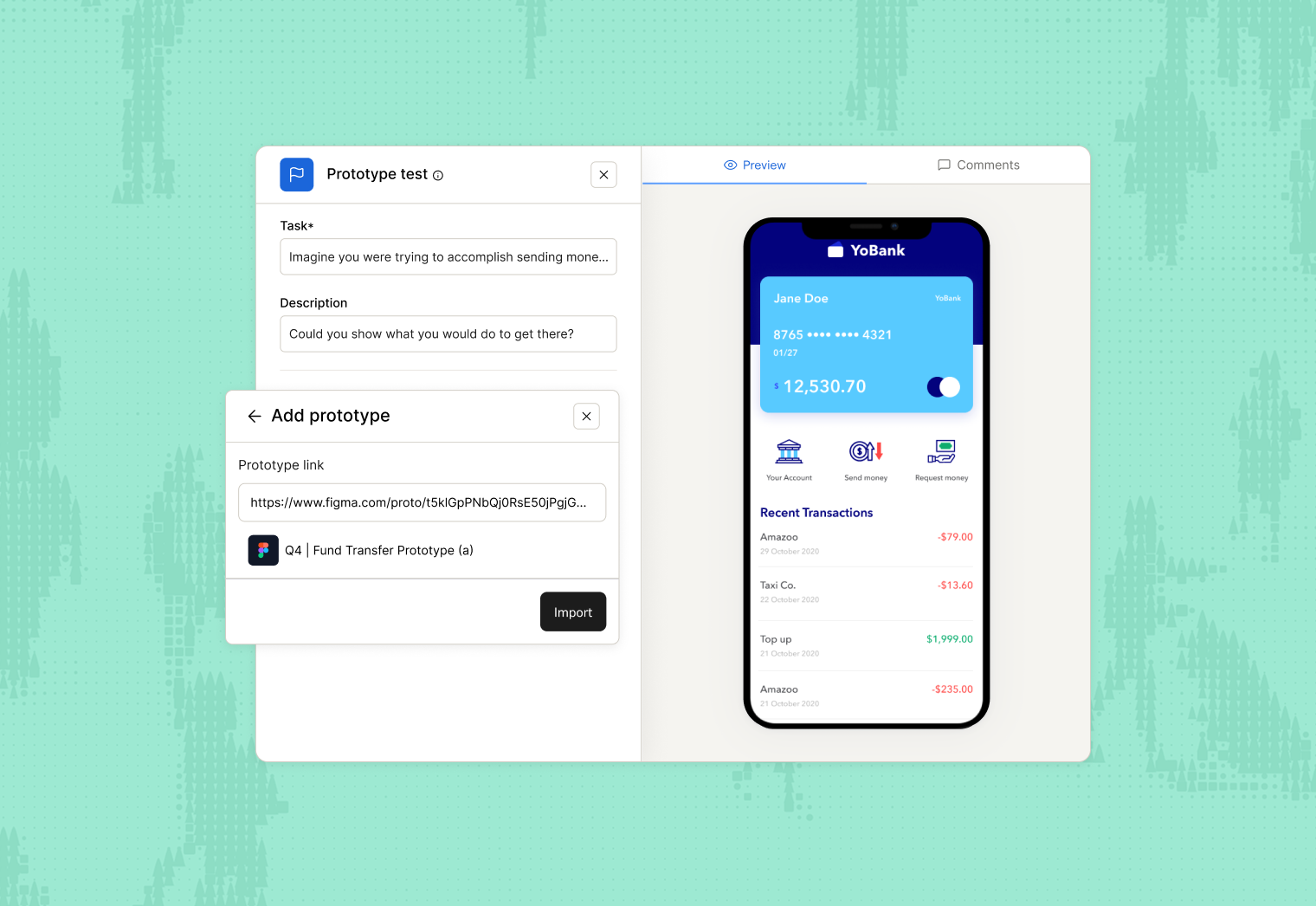
Plus, preparing a prototype or wireframe for users doesn’t need to be resource-intensive. A tool like Maze facilitates prototype testing to quickly validate ideas. Integrating with tools like Figma lets you present your prototype as a stimulus and even design tasks for users to complete. And if you don’t have your prototype ready yet, you can still connect Maze with AI-prototype generation tools like Bolt, Figma Make, Lovable, and Replit—helping you both create and test prototypes quickly.
Maze’s Automatic analysis then lets you collect feedback quickly and continuously while turning it into actionable insights and shareable reports for stakeholders, saving you even more time for user research.

Types of research stimuli (and examples)
Your research stimulus should depend on your research goals. There are many types of research stimuli, and each has a unique role in helping users evaluate your concept, design, or product. Here are the types of stimuli, along with research stimuli examples.
Visual and product stimuli
Visual and product stimuli are any stimuli you present to users that they can evaluate visually. The most common examples include low-fidelity mockups, wireframes, or prototypes used early in the discovery phase. Whether you’re designing an app, physical packaging, ad concepts, or brand collaterals, chances are, you’ll be using visual and creative stimuli in research.
You might ask participants for feedback on:
- A mobile app screen to test visual hierarchy and clarity
- A product card to see whether pricing and key details are obvious
- Packaging or an ad concept to probe brand fit and appeal

💡 Test visual stimuli without spending hours on interviews. Maze's AI moderator helps you get qualitative feedback on any visual stimulus. You can upload images of your studies, and the moderator automatically generates an image description and asks relevant follow-up questions.
Written and verbal stimuli
Written and verbal stimuli are all about communication. They depict your messaging, language, content design, and how you communicate your products or services to your audience.
Written stimuli are text-based prompts. Examples include e-commerce copy, feature lists, landing pages, taglines, messaging frameworks, email templates, and onboarding instructions. In some cases, written stimuli will come wrapped up with visual stimuli.
An example of a written stimulus is just about any website. Perhaps you’re conducting remote user research for the effectiveness of your landing page. You’d provide it to users for reading, and ask them follow-up questions about the service, such as: “What is this landing page selling?”
Verbal stimuli are spoken prompts used by researchers to guide participants through studies and elicit feedback.
Examples include interview questions, think-aloud instructions, task scenarios, and probing follow-ups. In moderated sessions, verbal stimuli help researchers explore user behavior, motivations, and understanding in real-time.
Perhaps you're conducting a usability test and need participants to navigate a prototype. You verbally instruct them: "Try to find and book a hotel room for next weekend," then observe how they approach the task while encouraging them to think aloud.
Tasks and activities as stimuli
Instead of showing a static wireframe, tasks and activity stimuli give participants a goal by presenting the user with tasks to complete. Then, you observe their behavior and potentially ask questions for insights. Tasks and activity stimuli prompt users to directly use your designs.
For example, if you’re building an e-commerce app, an activity stimulus could be a usability test with a task like: "Find and purchase a winter coat under $100."

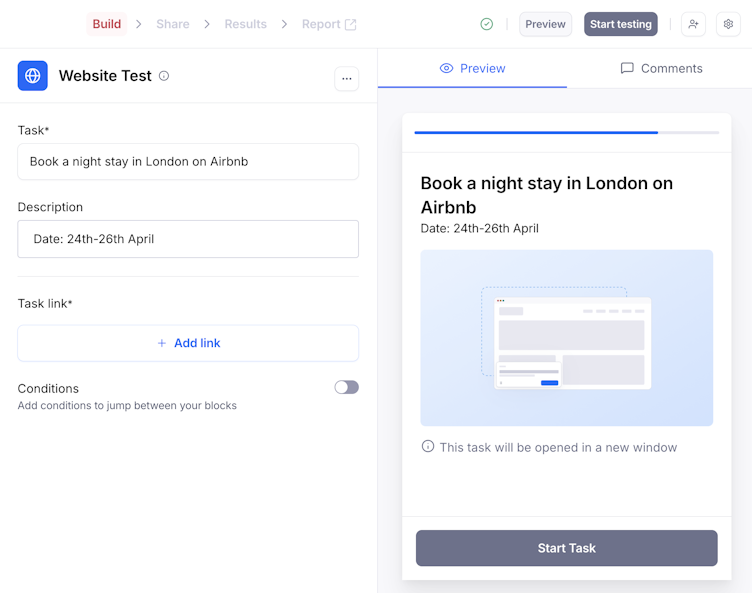
Tasks and activity stimuli are best for understanding your users’ exact behavior, rather than gathering theoretical opinions. And although all stimuli do that to some degree—task stimuli are the best at it, because they invite testers to use your product. Your findings are grounded in real, demonstrable actions. That translates to accurate insights such as task success rates, time on task, and drop-off points.
Conceptual stimuli
Conceptual stimuli are ideas, descriptions, or hypothetical scenarios used in research—not actual designs, prototypes, or finished products. You might be asking yourself: “How are those stimuli? Isn’t that the same as asking theoretical questions?”
Not quite.
Conceptual stimuli border theoretical questions, but still introduce the tester to something more concrete, even though it’s still just an idea. Some examples include:
- Concept boards: Mood boards or storyboards showing a product idea without final designs
- Scenario descriptions: Written scenarios like "Imagine you're planning a vacation and need to book a hotel..."
- Feature concepts: Descriptions of potential features without showing the actual interface
- Use case narratives: Stories about how someone might use a product in their daily life
- Video concepts: Rough animatics or storyboards for video ads before production
Conceptual stimuli are best for very early-stage research. You might not have settled on a specific problem yet, let alone created a design or user flow. It’s a great way to start concept testing or assessing the feasibility and overall demand for your product idea.
Perhaps you’re in market research and want to know whether there’s demand for a fitness app that tracks workouts and vital signs. Instead of creating a wireframe, you make a mood board like the one below.
You present it to your tester with a scenario:
"Imagine an app that combines your workout tracking with real-time health monitoring—heart rate, blood oxygen, recovery metrics—all in one place. Instead of switching between your fitness app and health app, everything syncs automatically. You'd see how hard workouts impact your recovery, get alerts if your vitals are off, and adjust your training based on your body's actual readiness. Would this be something you'd use? What concerns would you have?"
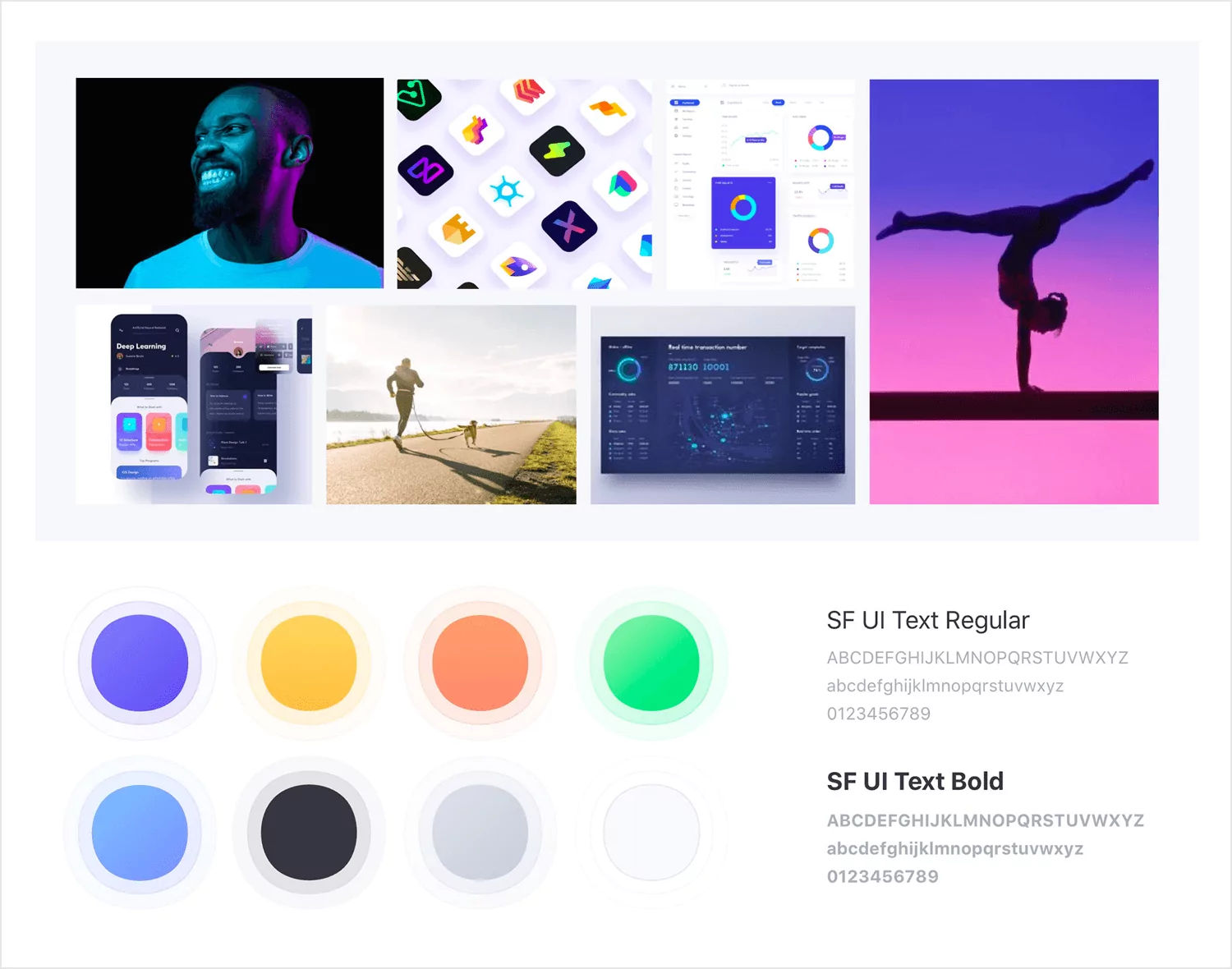
A moodboard example
Competitive stimuli
Your product might look good when there’s no other option on the table—but does it hold up to competitors? That’s exactly what introducing competitive stimuli to your research aims to answer.
You introduce competitor material to your participant, such as:
- Competitor websites or apps: A demonstration of how competitors solve the same problem
- Competitive pricing tables: Side-by-side comparisons of your pricing versus competitors
- Competitor marketing: Ads, messaging, or positioning from competing brands
- Feature comparisons: Grids showing which features different products offer
- Market alternatives: Examples of indirect competitors that solve the problem differently
Then you ask participants to evaluate options side by side, revealing whether your differentiation actually matters.
For example, let’s say you’ve created a food delivery service and you want to identify market gaps. You show your sales page alongside three competitors and ask them which service they’d most likely buy, and why. Competitor positioning is best for identifying market gaps and testing differentiation.
3 Best practices for avoiding bias and pitfalls with research stimuli
How you present your stimuli is just as important as showing stimuli at all. With a set standard, you can ensure that each stimulus prompts users to provide detailed feedback and actionable insights. Here are some best practices to help meet that standard for research stimuli in UX and market research.
1. Keep stimuli short and simple
Lengthy, complicated stimuli can confuse participants and even overwhelm them. When you show participants too much, too soon, you increase their cognitive load—which leads to them wasting much-needed energy on understanding your test rather than evaluating your design.
For visual stimuli, minimize clutter and ensure key elements are immediately recognizable. For verbal stimuli, keep your wording concise and precise. Task stimuli should be clear and relevant. Remember that participants have limited attention spans. If they can't quickly understand what you're showing them, you're measuring comprehension rather than what you want to study.
2. Consider how context impacts results
Your stimuli don’t exist in a vacuum. Variables like the order in which you present elements and the research environment affect participant responses. For example, let’s say you show a participant three different visual designs.
Due to participant overwhelm and fatigue, a relatively strong design might be rated lower by participants who’ve already reviewed similar designs earlier in your session. To lower this fatigue bias, randomize the order of stimuli across participants or limit the number of stimuli you show each participant.
Consider the format at different stages of product discovery as well. A written stimulus of your sales page will likely receive different feedback when you present it in a Google Doc, early in the problem discovery phase, vs. as a Figma file, later in the reiteration phase. This is precisely why you should test stimuli at various stages of your process, from product discovery through reiteration. As context changes, so will participant responses.
3. Mitigate the risk of cognitive bias
Cognitive biases are subjective mental judgments that can subconsciously shape the way you present and receive feedback on stimuli. Many researchers don’t even know when they’re using them.
Here are just some of the biases that can creep into your UX research and affect data quality:
- Framing effect: Participants react differently depending on whether they’re presented with a loss or a gain. For example, “This feature prevents errors in 90% of cases” is perceived more positively than “This feature fails in 10% of cases,” despite describing the same performance. Mitigate this effect by presenting the same information in a neutral or balanced form, or deliberately test both gain- and loss-based framings to confirm that conclusions don’t depend on how outcomes are expressed.
- Leading questions: Questions that imply a preferred or ‘correct’ answer steer participants toward a specific response. Avoid this cognitive bias by asking objective questions like: “What do you think of this design?” rather than “Do you agree that this design is effective?”
- Social desirability bias: Participants give answers they believe sound better, smarter, or more acceptable to the researcher. To counteract it, assure participants that there are no right or wrong answers before you introduce a stimulus, and encourage honest reactions.
How to leverage research stimuli with Maze
With a UX research tool like Maze, you can quickly upload and use research stimuli in every project. Choose from a wide variety of research methods—such as surveys, user interviews (both researcher-led and AI-moderated), prototype testing, tree testing, A/B testing, and more—and add research stimuli as required. For example, Maze provides the tools and capabilities to add:
- Visual stimuli, such as images, designs, prototypes, and live websites to your tests
- Written stimuli in the form of text-based prompts throughout the research study
- Verbal stimuli from researchers during moderated testing
- Task instructions to research studies, such as task scenarios, think-aloud prompts, and more
- Conceptual stimuli like mockups, wireframes, and moodboards
- Competitive/comparative stimuli presented simultaneously for side-by-side comparison
And the best part is that you can add various types of stimuli to the same research study. If you need to create a survey that presents written, visual, and task stimuli, you can. If you want to conduct interviews with verbal, conceptual, and competitive stimuli, you can.
Let’s consider an example for use of stimuli: say you want to create task-based stimuli for your test participants. You have visual stimulus in the form of a low-fi prototype and a task in mind ready to go.
Here’s exactly how Maze can help.
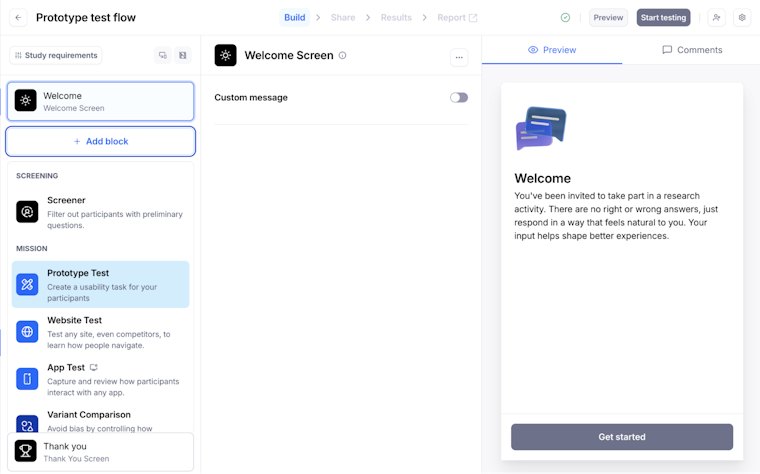
1. Create a prototype test block
Open your draft maze or create a new maze by clicking on ‘New Study’. From the blocks list, click ‘Add block’, then select the ‘Prototype test block’ from the drop-down menu.

2. Define your task and scenario
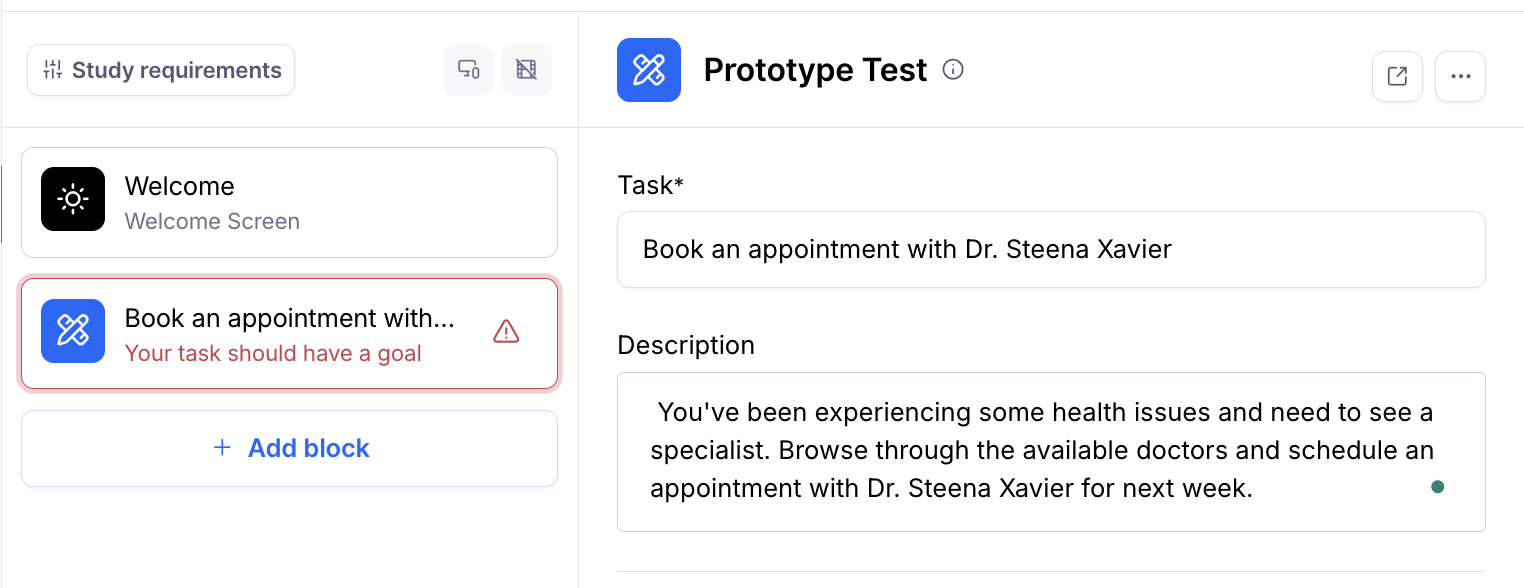
Start by defining the ‘Task’ in one sentence. The task should set a clear action for participants to complete. For example, “Create an account” or “Find a pricing plan that fits your team”. Use verbs, keep it short, and focus on one goal at a time.
Even though the ‘Description’ field is optional, use it to add any extra context participants need, without overwhelming them. Aim for one or two short sentences that set the scene. If there are extra details, like a budget, a time limit, or specific conditions for the task, put those in the description rather than in the task itself.

3. Import and configure your low-fi prototype
Click ‘Add prototype’ in your Prototype test block and paste the prototype link from your design tool. Maze will pull in all the screens from your low-fi flow.
Maze supports prototypes from Figma as well as AI prototype generation tools like Bolt, Figma Make, Loveable, and Replit, so you can validate AI-generated prototypes. Plus, Maze works with prototypes designed for desktop, tablet, or mobile devices.

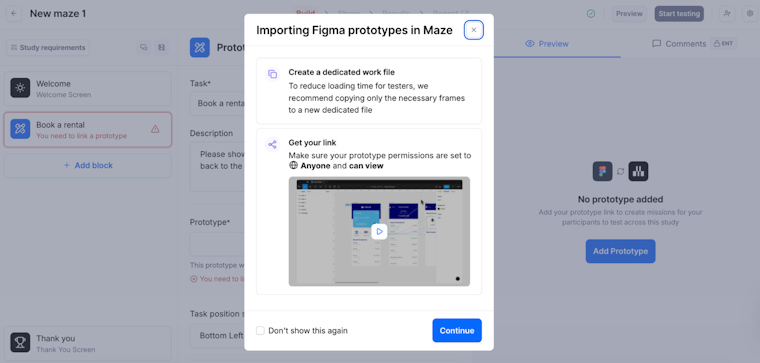
Next, choose the ‘Start screen.’ This is the first screen participants will see when they begin the mission. This should match the point in the journey where your task naturally starts. You can change the start screen later at any time by selecting ‘Edit start screen’ and picking a different screen from the list.
At this stage, your prototype becomes the visual stimulus for the task. This is what participants will use while they try to complete the goal you defined.

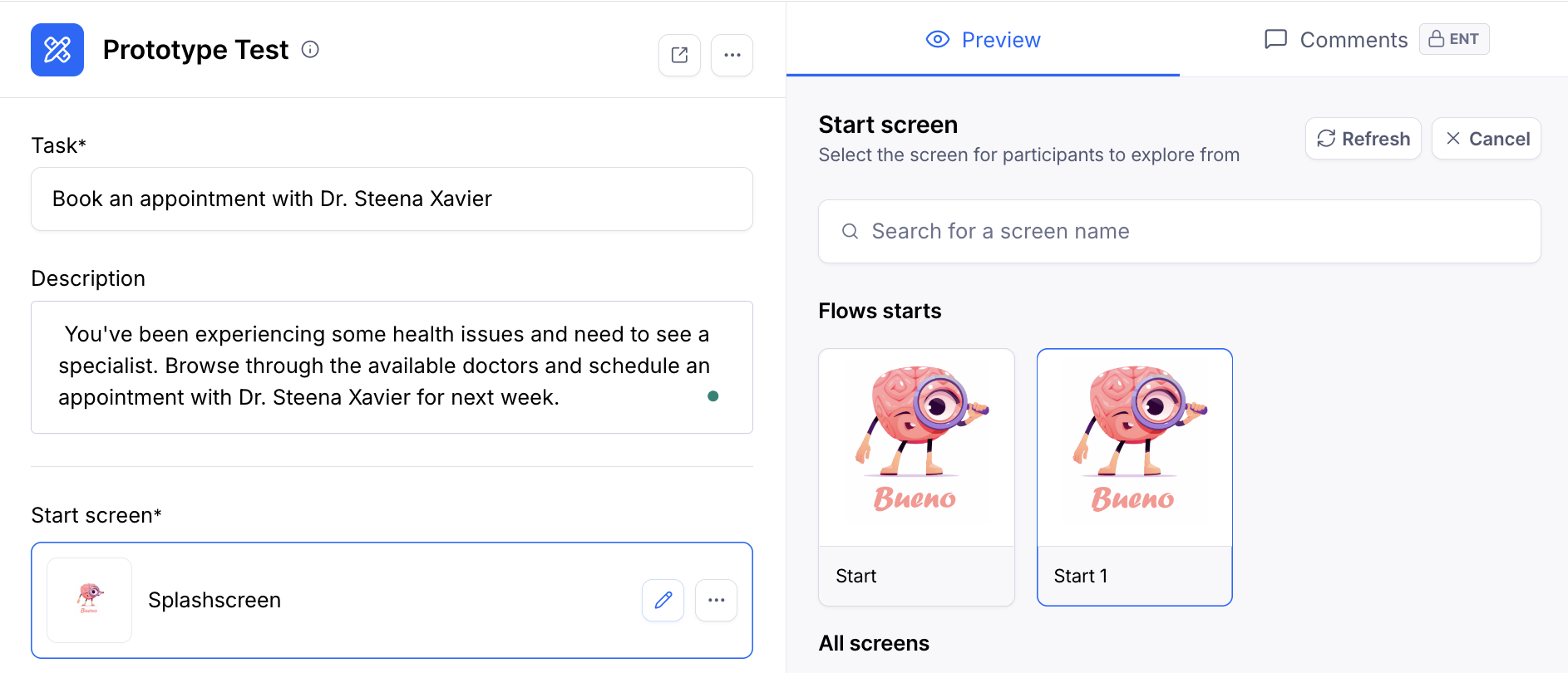
Defining the task and selecting a start screen in a Maze Prototype Test
4. Set your task type and success criteria
In the ‘Task type’ section, choose how you want participants to interact with your prototype.
You can opt for ‘Free explore’ when you want participants to move around freely and tell you what stands out, confuses them, or feels interesting, without a fixed goal.
For ‘Goal-based’ tasks, define your success criteria under ‘Success criteria’:
- Reach a specific screen: Count the task as successful when participants land on a particular screen (for example, the confirmation page).
- Follow an exact path: Require participants to go through a specific sequence of screens. This is useful when the exact flow matters, such as a checkout funnel.

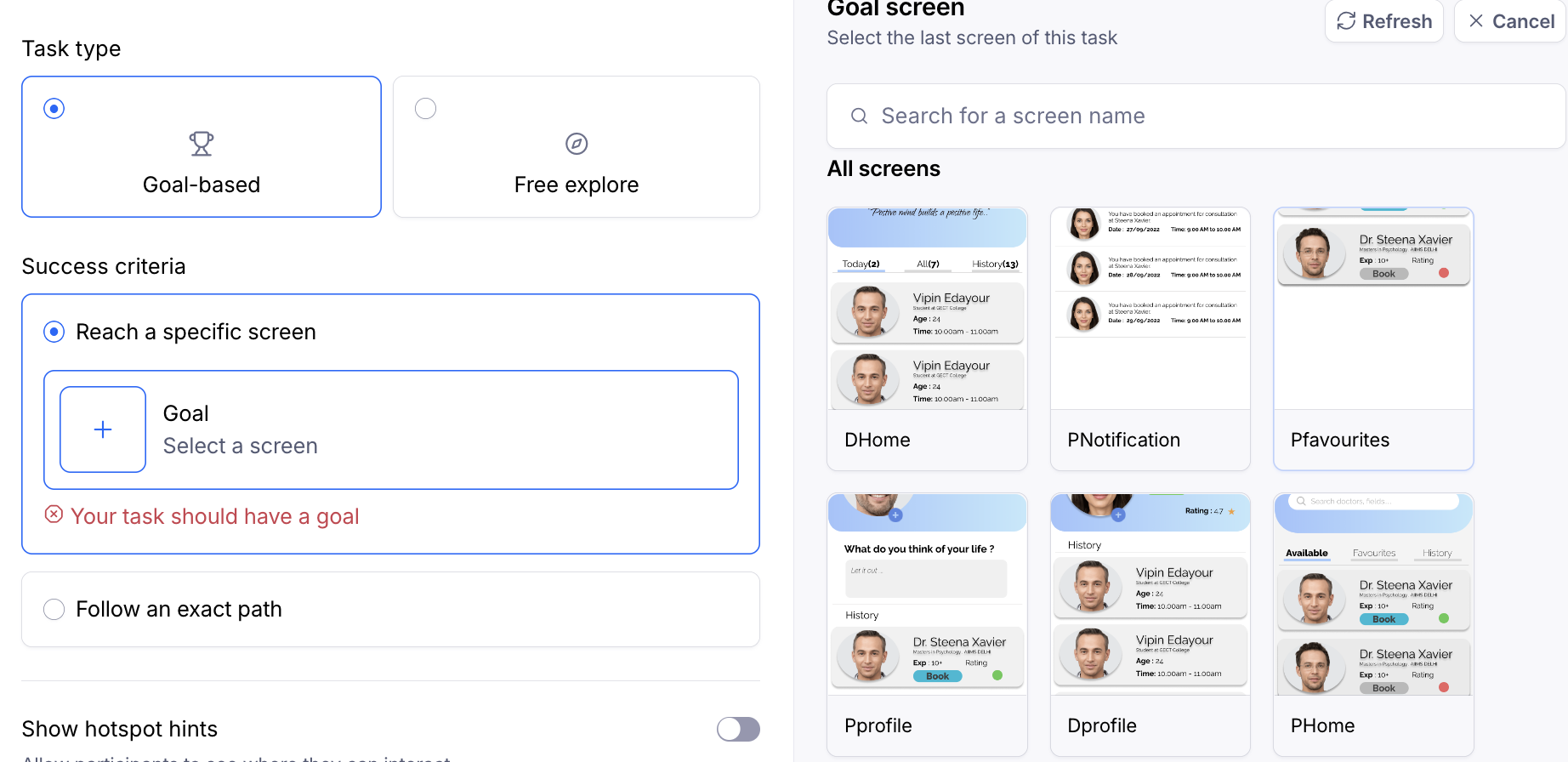
You can also choose whether to show hotspot hints, which highlight interactive areas for participants. Leave this off when you want to test how discoverable interactions are, and turn it on if your prototype is very low fidelity or you want to reduce confusion about where to click.
5. Preview and publish your test
Once everything is uploaded, you can preview how it looks by clicking ‘Preview’ in the top-right corner. This shows you how testers will see your Maze without recording any data.
When you’re ready to publish your study, click ‘Start testing,’ located in the top right corner of the screen. Then, click ‘Go live’ to confirm.

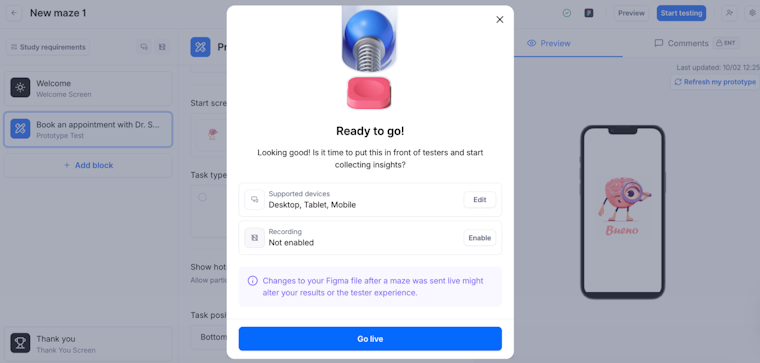
Previewing and publishing your Maze prototype test
And with that, you’re ready to start with data collection from users with the help of research stimuli. Congrats!
Run stimulus-based tests from start to finish with Maze
Maze doesn’t just make creating tests with stimuli quick and easy with its comprehensive suite of UX research methods. It’s an end-to-end solution for getting decision-driving insights through user and market research—from participant recruitment and management all the way through to research analysis, reporting, and democratization.
You can recruit from a pool of millions of participants with Maze panel, offering over 400+ filters and qualified testers. Maze Reach enables you to manage participants, including those you’ve already sourced yourself.
When it comes to analysis, Maze AI helps summarize open-ended feedback and surface recurring themes. With stakeholder-ready reports, you can turn responses into dashboards and shareable reports with metrics like task success rate and time on task, so it’s easier to walk stakeholders through what you tested and what you recommend.
With Maze, you get a comprehensive, AI-first, end-to-end user experience research platform—complete with the solutions you need to move from question to answer to action.


Frequently asked questions about research stimuli
What are research stimuli?
What are research stimuli?
Research stimuli are controlled, tangible artifacts you show participants to prompt reactions and feedback during user research. Research stimuli can take many forms, such as visual, verbal, written, task-based, conceptual, and competitive stimulus.
When should I use research stimuli instead of just asking interview questions?
When should I use research stimuli instead of just asking interview questions?
Use research stimuli whenever abstract questions could lead to vague or hypothetical answers. If you’re asking users to evaluate pricing, features, messaging, or flows, showing them a real or semi-real artifact will produce richer insights than asking what they think they would do.
What are examples of effective research stimuli for digital products?
What are examples of effective research stimuli for digital products?
Effective research stimuli include wireframes, clickable prototypes, landing pages, onboarding flows, pricing pages, feature descriptions, and usability tasks.
How many stimuli can I safely test in a single study without overwhelming participants?
How many stimuli can I safely test in a single study without overwhelming participants?
There is no magic number when it comes to the correct quantity of research stimuli per research session. It depends on the complexity and duration of your research study. The key is to avoid overwhelming participants with too much. If in doubt, split your research stimuli over multiple research sessions/studies.
How can I test multiple versions of stimuli (e.g., concepts or designs) using Maze?
How can I test multiple versions of stimuli (e.g., concepts or designs) using Maze?
You can test multiple stimuli within a single maze using the ‘Variant Comparison’ block (Enterprise plan) or by adding multiple prototype/concept blocks and controlling distribution. Alternatively, you can create duplicate mazes for each version if preferred.
What’s the difference between research stimuli for qualitative vs quantitative studies?
What’s the difference between research stimuli for qualitative vs quantitative studies?
Qualitative research stimuli are designed to spark open-ended exploration, discussion, and deep insights into user motivations and human behavior. These stimuli encourage participants to explain their thought processes, feelings, and reasoning through open-ended questions, interviews, focus groups, or observational tasks.
Quantitative research stimuli are standardized to enable measurement, comparison, and statistical analysis across the product development process. These stimulus materials help you collect numerical data through structured tasks with predefined success criteria, rating scales, or multiple-choice questions. For example, presenting the same prototype to all respondents with a specific task and measuring completion rates, time on task, misclick rates, or satisfaction scores on a Likert scale.