
















TL;DR
UX research creates value when it leads to better decisions. UX research principles are the practices that make that possible. They help teams plan better studies, involve the right people, reduce bias, and turn findings into clear action.
These 10 principles help you run studies your team can trust and act on:
- Stay user-centered
- Set clear goals and questions for your target audience
- Test early and often with real users
- Use mixed UX research methods
- Recruit the right participants based on demographics and user needs
- Reduce bias at every step
- Collaborate with stakeholders and your design team
- Turn insights into specific next steps
- Track outcomes after changes using clear metrics
- Handle ethics, consent, and privacy by default
Maze supports the workflow end-to-end through targeted recruiting, scalable interviews and analysis, and shareable user experience research and UX design reporting that keeps insights visible while teams plan, design, and iterate.
UX research principles are the rules of thumb that help you conduct decision-driving UX research. They help guide how you plan studies, work with participants, choose research methodologies, and share user feedback, so your team can trust and act on the results of user research.
In this article, we walk through 10 guiding UX research principles you can use to run better studies and make clearer, more confident Product decisions. We spoke to Design leaders from Wise, Aha Studio Inc, Doist, and Design+Code for their insights on the value of these UX research principles and how they apply them.
10 Core UX research principles
UX research is easier to run and act on when it’s grounded in a shared set of principles that support user-centric decisions.
These 10 core user research principles give product managers, designers, and their teams a simple checklist for planning studies, working with participants, and turning learnings into confident product decisions that reflect real user behavior and pain points:
- Have a user-centered mindset
- Define clear questions and goals
- Test early and often with user testing
- Use mixed UX research methods
- Recruit the right participants
- Reduce bias at every step
- Follow a collaborative approach with stakeholders
- Make insights actionable and use them to validate design decisions
- Close the loop with decisions and outcomes
- Follow ethics, consent, and privacy by default
1. Have a user‑centered mindset
A user-centered mindset means making product decisions with a clear understanding of what users need, expect, and experience, not just what the team assumes is best.
In UX research, this means bringing user insights into decisions early and often. You use research to understand how people behave, what frustrates them, what matters most to them, and where your product fits into their lives.
People act a certain way so their behavior needs to be observed and researched before designing a product for them.


Andreea Mica
Former Visual & UX Designer at Design+Code
Share
For example, a Product team might plan to redesign a dashboard by adding more charts, filters, and alerts because stakeholders want it to feel more powerful.
A user-centered approach would first look at how customers use the dashboard. Research might show that most users open it for one reason: to quickly check whether performance is up or down, spot any issues, and decide if they need to take action.
Instead of adding more information, the team might prioritize a clearer summary at the top, simpler navigation to key metrics, and obvious alerts when something needs attention.
This principle also connects directly to user-centered design. Both put users at the center of discovery, testing, and iteration, so your roadmap is shaped by real needs. If the mindset isn’t user‑centered from the start, even good research methods can end up answering the wrong questions for the wrong people.
2. Define clear questions and objectives
Start by separating research objectives (why you’re doing this study) from research questions (what you need to ask to reach that goal).
An objective sounds like “Identify why trial users don’t return after day one” or “Compare whether the new navigation helps people find key actions faster,” while a research question sounds like “What do trial users expect to see after they sign up?” or “How long does it take users to find and start task A in the new vs. old navigation?”
You can also include open-ended questions to uncover new pain points and qualitative data you might not anticipate at the start.
Once you’ve agreed on objectives and questions, you can choose UX research methods that actually answer them, write better tasks, and then capture all of this in a simple UX research plan so the study stays focused and tied to a specific product decision.
This plan should clarify which data you’ll track, what kind of usability testing or A/B testing you’ll run, and how you’ll validate outcomes with real users.
3. Test early and often
Don’t wait for a big launch moment to bring users in. Run small user testing sessions throughout discovery, design, and after release so issues are identified when they’re still easy to address and cheap to fix in the development process.
In early discovery, that might mean generative research, like interviews and field studies, to understand problems and context. In later stages, it means evaluative studies like usability tests, tree tests, or A/B tests on prototypes and live experiences to see whether your solutions work.
You need to listen clearly and understand your users. Otherwise, you can’t offer a great experience.


Alex Muench
Lead Product Designer at Doist
Share

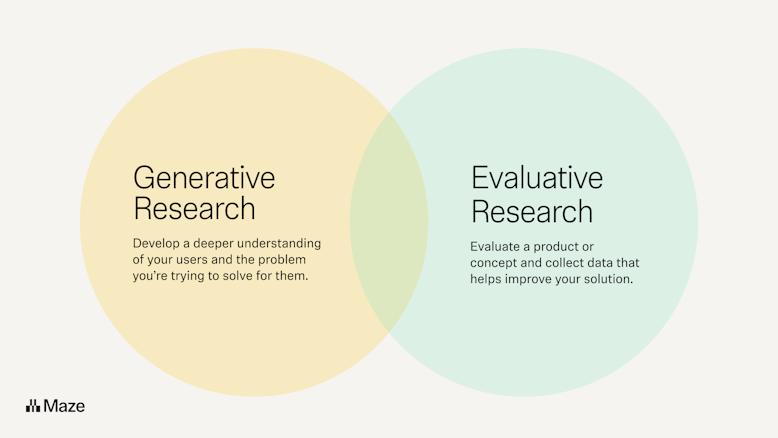
As a rule of thumb, aim to test at key milestones: when you’re exploring a new problem, when you have a first concept, when you iterate on a prototype, before launch, and at regular intervals post‑launch. Of course, you’ll need to use a mix of UX research methods suited to each moment.
You can also lean on AI to support with research-related tasks, such as drafting studies, generating research questions, and analyzing data. And you won’t be doing it alone; our 2026 Future of Research Report found that teams are using AI to support research more than ever before.
In doing so, 63% of researchers are reporting faster turnaround time, and 60% improved team efficiency. By handling repetitive, time-intensive tasks, AI is shortening the time between question and insight, enabling teams to test more often.
The most immediate application for AI has been replacing the repeatable parts of research execution.


Dalia El-Shimy
Director of User Research, Wise
Share
4. Use mixed methods
Mixed methods UX research means deliberately combining qualitative research and quantitative methods to see both what is happening and why. For example, you might pair user interviews (to hear people’s stories) with product analytics or task‑success data (to measure how often something happens and how severe it is).
Relying on only one type of method creates blind spots. If you only run usability testing or look at survey data, you risk missing underlying motivations. If you only interview people, you might over‑index on a few loud voices and misjudge how common a problem actually is in your quantitative data.
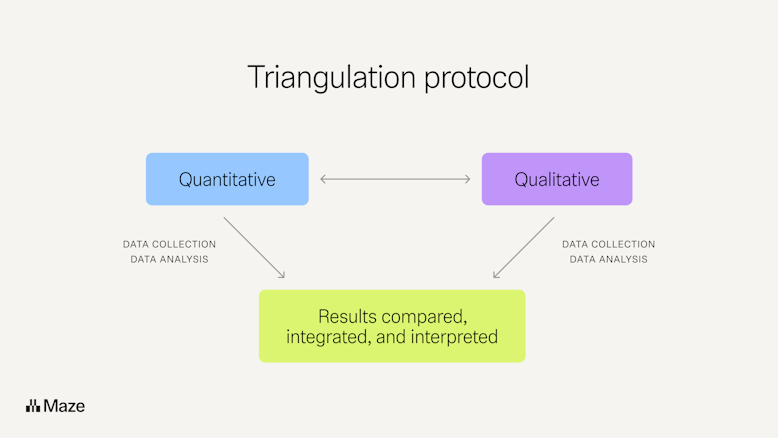
One practical way to do mixed methods well is to use triangulation. You answer the same question with several methods or data sources and check whether they tell a consistent story.
A simple triangulation workflow might be: you spot a drop in completion rate for a key task (analytics), run a short usability test to see where people get stuck, and then interview a handful of users to understand their context. If all three lines of evidence highlight the same issue, you can confidently validate the problem and prioritize it in your product development backlog.

5. Recruit the right participants
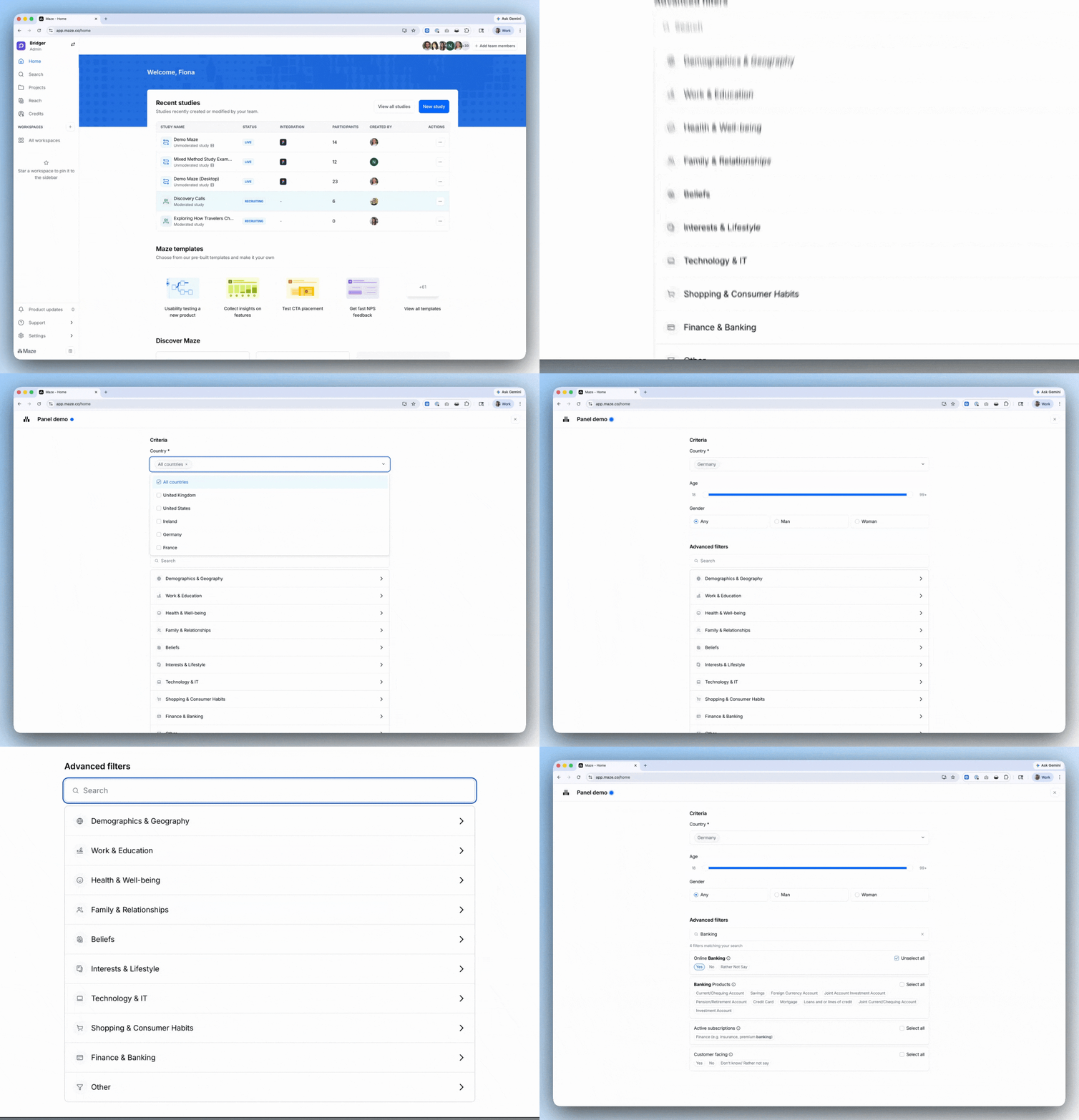
For each study, you should define who you need to hear from. For example, “new self‑serve admins in SaaS companies” or “weekly active mobile users who created a project in the last month”. Then, recruit them. That often means screening for behaviors, demographics, and user personas.
A research platform like Maze helps you recruit participants in two ways. With Maze panel, you can quickly source vetted participants from millions of testers across 130+ countries using 400+ filters, so you can target very specific profiles and get results in hours.
With Maze Reach, you build your own participant database—importing your users, segmenting them by traits and past activity, and sending targeted research campaigns—so you’re not starting from scratch every time you run a study.
Together, Maze panel and Reach give you both net‑new participants and a reusable pool of your own customers, so you can consistently recruit the right people for each question you’re trying to answer. Plus, users recruited by panel can later be added to your participant management flow in Reach.

6. Reduce bias at every step
Bias creeps into UX research at many points: who you recruit, how you phrase testing scripts, how you moderate sessions, and how you interpret what you hear. But bias makes for inaccurate research, meaning you need to eradicate it wherever possible.
There are at least 11 common types of cognitive bias that can affect your studies—including sampling bias, leading questions, social desirability bias, confirmation bias, anchoring, framing, and recency bias.
Here are simple ways people who do research (PWDRs) can reduce bias in day‑to‑day work:
- When recruiting: Use screeners to filter for the right behaviors, avoid only talking to fans or power users, and cap how often the same person can take part.
- When writing questions: Avoid leading wording (“That was confusing, right?”), Yes/No questions for complex topics, and questions that imply your preferred answer. Instead, ask neutral, open-ended questions like “What did you expect to happen here?”
- When moderating: Keep your tone neutral, don’t rescue users too quickly, and don’t over‑explain the user interface. Let people struggle so you can see real issues, and ask “What makes you say that?” instead of defending the solution.
- When analyzing: Write down your hypothesis before you look at data, then deliberately search for evidence that contradicts it to counter confirmation bias. Have a second person review notes or clips and see whether they reach the same conclusions.
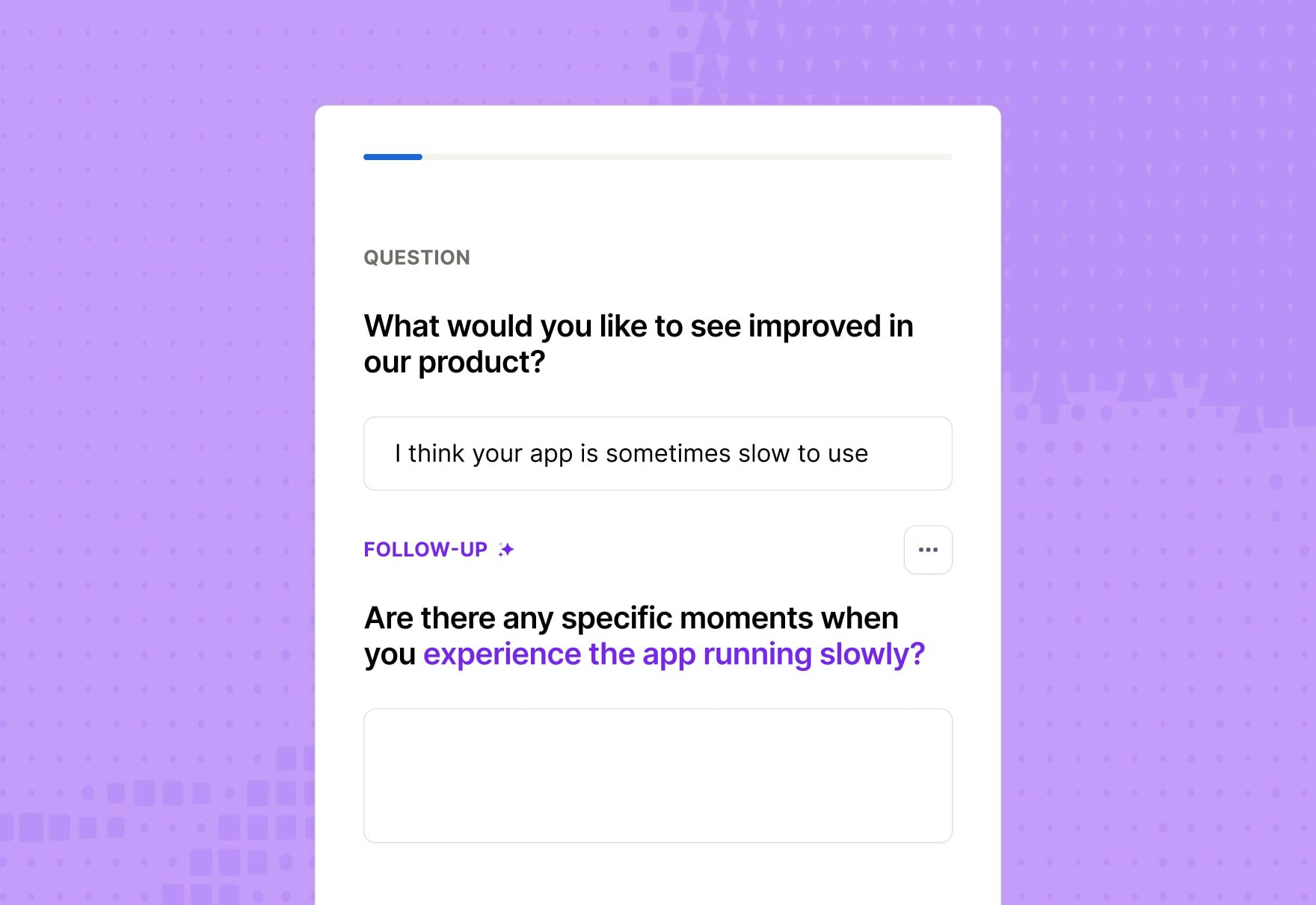
If you use Maze, the AI moderator can help reduce bias by supporting research studies with consistent, neutral phrasing and follow-up questions. That lowers the risk that a human researcher’s tone, wording, or expectations push participants toward certain answers.
Maze AI can also support bias reduction in other research workflows, such as drafting survey questions or refining discussion guides. That helps teams spot leading phrasing earlier and keep questions more neutral before a study goes live.

7. Follow a collaborative approach
Involve PMs, designers, engineers, marketers, and customer‑facing teams early, so research questions match real product bets, technical constraints, and known customer issues.
Make it easy for people to join the research process. Long gone are the days of UX research solely being conducted by researchers and designers. Now, individuals across organizations are conducting research:
- PMs (39%)
- Market researchers (35%)
- Marketers (23%)
- Data analysts (19%)
- Customer success managers (10%)
- Engineers/Developers (8%)
- Sales reps (7%)
More teams than ever are now involved in UX research, with intuitive tools—like Maze—that don’t require in-depth research knowledge, making research more accessible for non-researchers. And it’s providing some unexpected advantages:
You would think the biggest unlock of continuous research is speed. It's actually that teams ask research questions they would have skipped if it meant waiting three weeks for a dedicated study.


Amanda Gelb
Strategic Researcher at Aha Studio Inc
Share
You can also invite teammates to observe studies, take notes, and discuss what they saw together; simple rituals like a 30‑minute ‘watch and debrief’ session after a round of testing do more for buy‑in than a long slide deck.
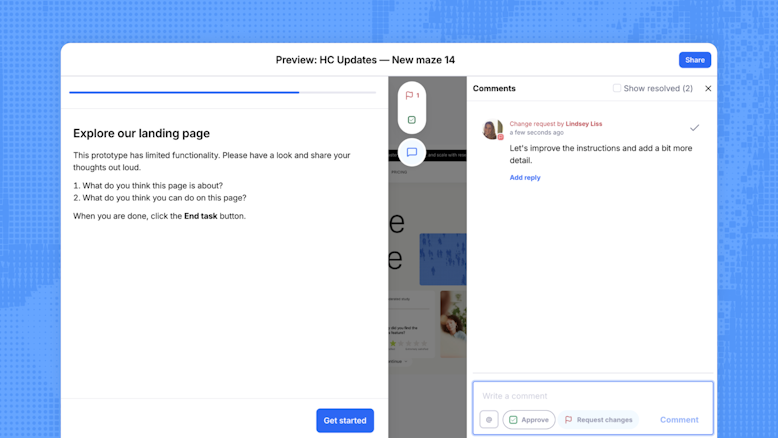
With Maze, you can invite collaborators to specific projects without making them full team members, so stakeholders, clients, or partners can help review and refine studies when it matters most.
Features like comments on maze blocks, review and approval flows, and commenting on reports let teammates discuss questions, suggest changes, and react to findings directly in context. You can also connect Maze to Slack to send live completion updates into shared channels, so the whole team can see research progress and jump into conversations as results come in.

8. Make valuable insights actionable
Research only creates value when it changes what your team does next. And with the 2026 Future of Research Report highlighting that research is informing both product and strategic decisions in 41% of businesses, failing to make insights actionable means you’re being left behind.
That means going beyond ‘interesting findings’ to clear, prioritized recommendations that map directly to product decisions, user journeys, and metrics.
Actionable insights are specific (“simplify the onboarding form from five steps to three to reduce drop‑off at step two”), tied to evidence (clips, quotes, numbers), and connected to owners and timelines. They also validate your design decisions and give you a clear way to track conversion rates and task success over time.
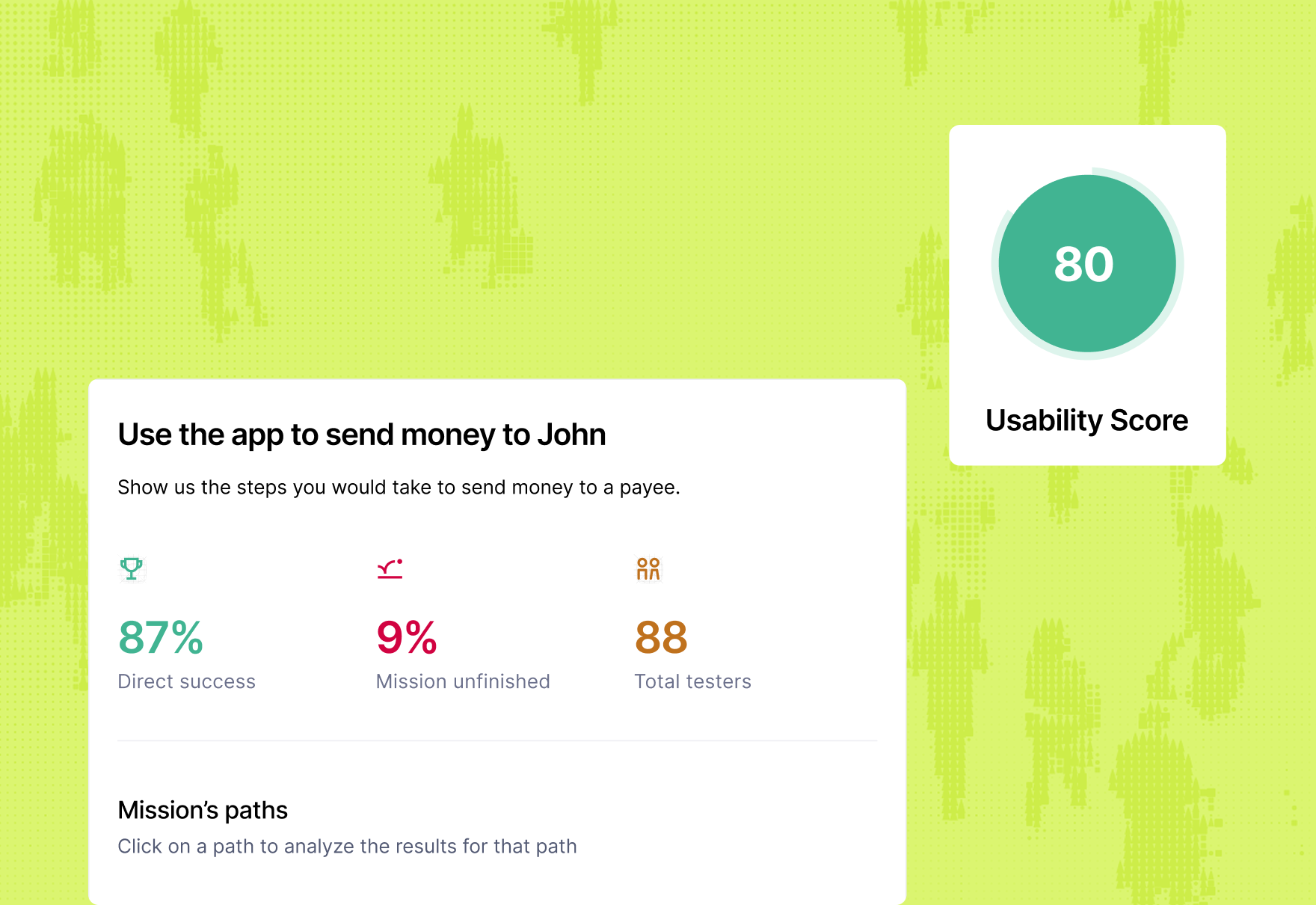
Maze’s Automated UX reporting turns raw test data into ready‑to‑share reports with usability scores, success metrics, path analysis, and heatmaps. So PMs and designers can see where users struggle at a glance.
AI‑powered theme analysis and summaries help you cluster qualitative feedback into clear themes, making it faster to move from “what people said” to “what we should do.” Visual elements like heatmaps and path analysis snapshots make it simpler to explain findings to stakeholders, and embedding reports into tools like Figma, Slack, or other workspaces keeps insights where decisions happen.

9. Close the loop with decisions and outcomes
Closing the loop means tracking which recommendations were acted on, what changed in the experience, and how that affected user behavior and business outcomes—like conversion, retention, or task success.
For example, let’s say your research shows that 40% of new users drop off on step two of onboarding because they don’t understand a required field.
You turn that insight into a concrete decision, like rewriting the field label, adding help text, and removing one optional field. You deliver the change, and then check the completion rate and day‑one activation again.
If drop‑off falls to 15% and activation improves, you’ve closed the loop from insight to outcome and can clearly show how research improved the product.
10. Follow ethics, consent, and privacy by default
Ethics in UX research means respecting participants as people first. It means minimizing harm, being honest about what you’re doing and why, and giving them real control over their data and participation.
That starts with informed consent (clearly explaining the purpose of the study, what you’ll do with recordings and data, any risks, and participants’ right to withdraw at any time) rather than just asking them to ‘agree’ quickly.
Ethical research also depends on how you handle privacy and data after consent. That means collecting only the personal information you truly need, protecting it properly, being transparent about where it’s stored and who can access it, and clearly flagging if any third‑party or AI tools are involved in processing it—especially for vulnerable groups or sensitive topics.
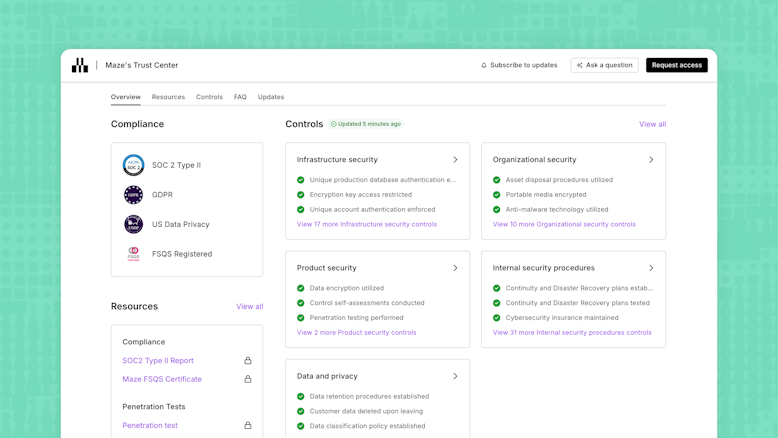
Maze supports this with enterprise‑grade security and compliance (including GDPR and SOC 2 Type II), along with clear AI guardrails and opt‑out controls, so teams can use features like AI moderator and automated analysis while staying aligned with security and ethical standards.

Common mistakes that go against UX research principles
Even experienced teams slip into habits that quietly undo their own research. Here are some common mistakes to watch for and what they lead to:
- Treating research as a one‑off checkbox: Only running studies before big launches—and skipping tests during discovery, prototyping, and after release—means you catch issues late, when they’re expensive to fix and already baked into the product
- Jumping into sessions without clear objectives or questions: Starting interviews or usability tests to “see what happens” leads to scattered conversations, generic feedback, and insights that don’t connect to any specific product decision
- Recruiting whoever is easiest instead of real users: Testing with colleagues or friends, instead of people who match your target audience, skews your findings and hides the real problems your actual users face
- Relying on a single favorite method for every question: Using only surveys, only usability tests, or only analytics means you either see numbers with no context or stories with no sense of scale, making it easy to misjudge how big or important an issue really is
- Keeping stakeholders out of the process: When researchers work alone and only share a report at the end, product managers, designers, and engineers don’t feel involved or accountable, so insights are more likely to be ignored or de‑prioritized
- Rushing consent and glossing over data use: Skimming past consent, not explaining where recordings and survey data go, or hiding the use of AI tools erodes trust with participants and can expose your team to ethical and compliance risks
Over time, these mistakes lead to product decisions based on incomplete evidence, misread user needs, and issues that could have been caught earlier. Following UX research principles helps teams avoid those risks, so research stays credible, actionable, and connected to better outcomes.
Make UX research principles part of every project with Maze
UX research is only useful when it consistently shapes what you build, how you iterate, and which ideas you invest in. Maze helps you turn these research principles into an everyday habit.
With Maze, you can recruit the right users, quickly run prototype testing, live website testing, and mobile testing, and turn sessions into shareable reports that influence product decisions and help you win stakeholder buy-in. You can optimize conversion rates, reduce pain points, and continuously improve functionality based on ongoing user testing.
When research principles are built into the workflow, teams can make better, evidence-based decisions and build products that reflect real user needs.


Frequently asked questions about UX research principles
What are UX research principles?
What are UX research principles?
UX research principles are the core guidelines that help you plan, run, and apply research in a consistent, user-centered way. It includes understanding your users, defining clear questions, choosing the right user research methods, reducing bias, and turning findings into product decisions that validate your design decisions.
What is the risk of ignoring principles for conducting UX research?
What is the risk of ignoring principles for conducting UX research?
If you ignore UX research principles, you risk running studies that look busy but don’t actually inform decisions. That usually leads to wasted time and budget, misleading insights, and teams losing trust in research because it doesn’t change what they build.
How do I ensure that I apply these guiding principles to my UX research practice?
How do I ensure that I apply these guiding principles to my UX research practice?
Start by turning each principle into one or two concrete habits in your process. For example, always writing research questions before recruiting, or always doing a short debrief after each study. Then bake those habits into your templates, checklists, and rituals (like sprint reviews or research readouts), so they’re hard to skip even when deadlines are tight.
How does Maze help ensure you’re following these principles?
How does Maze help ensure you’re following these principles?
Maze helps you follow UX research principles by giving you structured ways to plan, run, and analyze studies in one place. Features like templated study flows, participant management and recruiting, AI‑assisted question checks, and automated analysis make it easier to ask better questions, reach the right people, and turn results into clear, shareable insights.