







Chapter 7
Running moderated and AI-moderated interview studies
Moderated and AI-moderated interviews add a qualitative layer to your research, helping you uncover the context, motivations, and expectations behind what people do in your product. In Maze, interview studies give you flexible ways to run and analyze conversations at scale—whether you’re moderating or working with an AI copilot.
In this chapter, we'll cover:
- The difference between moderated and AI-moderated interviews
- Choosing the right interview type
- How to create a moderated interview study in Maze
- How to create an AI-moderated interview study in Maze
- Post-interview analytics and reporting
What are moderated interview studies?
Moderated interview studies are live research sessions where you and a participant talk in real time, usually over video or audio, using a flexible discussion guide. You might show a prototype, concept, or idea in Maze, then ask follow-up questions to understand what people think, feel, and do as they move through it.
This enables:
- Flexibility and depth: Follow up based on participant responses and explore what matters most
- Context-rich insights: Understand the ‘why’ behind user decisions and behaviors
- Real-time clarification: Reframe questions, ask follow-ups, and dig into unexpected themes
With a human moderator in the session, you can clarify unclear answers, ask follow-up questions when someone hesitates or seems confused, and adapt your script if a task is harder or easier than expected.
This makes moderated user interviews especially useful when you’re exploring new problems, testing early ideas, or trying to understand specific behaviors and emotions.
Moderated interview studies in Maze

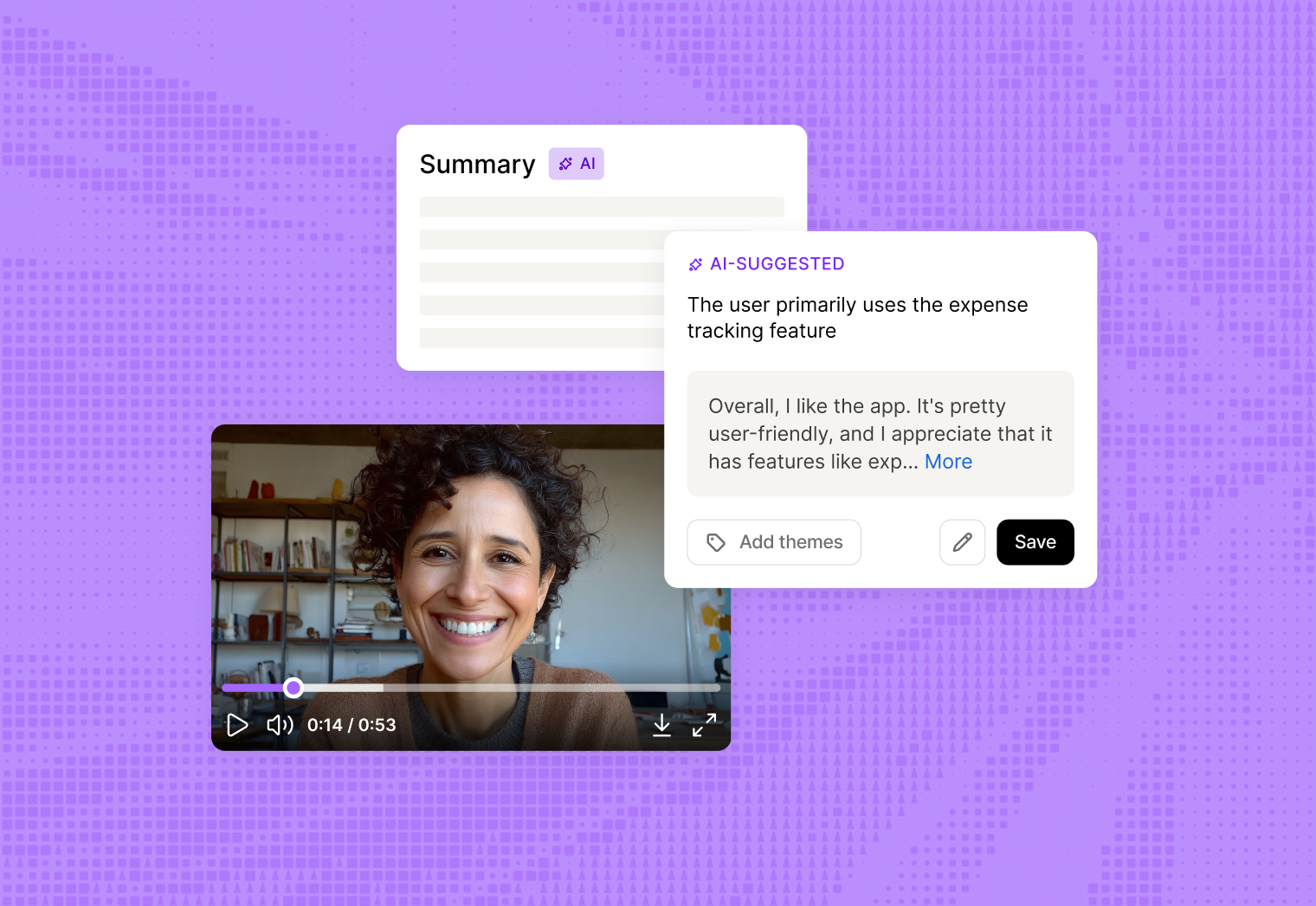
Traditionally, moderated research required juggling separate tools for scheduling, video calls, recording, and transcription. Maze Interview Studies—Maze’s moderated interview solution—offers an end‑to‑end workflow that brings scheduling, conferencing, recording, transcription, and analysis into one place.
Maze supports the full moderated interview lifecycle, including:
- Participant recruitment and scheduling: Maze lets you share recruitment links, sync availability, and let participants book into open time slots, reducing back-and-forth and keeping you focused on the conversations themselves
- Conferencing and session capture: You can host interviews using built-in video conferencing capabilities or tools like Zoom, Google Meet, or Microsoft Teams, with unique meeting links, automatic recordings, and space for observers to join without disrupting the session
- Transcription, highlights, and themes: Each session generates a transcript you can review, highlight, and tag, while AI helps notice patterns and themes across interviews, so analysis doesn’t start from a blank page
- Reporting and sharing: Maze turns your interviews into reports that identify key themes, quotes, and clips, making it easy to share findings with links or export them into decks, documents, and roadmaps
With everything centralized in Maze, moderated research becomes easier to scale and share across teams.
What are AI-moderated interview studies?
AI-moderated interview studies use an AI moderator to lead or support live research conversations with participants, following a discussion guide you define. The AI moderator prompts participants, reacts to their answers, and keeps the conversation focused on your pre-defined goals.
AI-moderated interview studies are best suited to early-stage, generative research at scale, such as exploring a new market, understanding how people currently solve a problem, or testing how relevant a potential problem is for a specific audience.
AI-moderated studies in Maze
Maze’s AI moderator runs interviews for you, so you can get rich qualitative insight without moderating every session yourself.
AI moderator helps you:
- Run interviews at any time, across time zones: Participants can join when it suits them, and the AI moderator runs the conversation without needing a researcher on the call
- Keep conversations focused on your goals: You define what you want to learn and provide context; the AI uses this to ask questions, listen to answers, and add dynamic follow-ups that stay on topic
- Capture open-ended feedback as natural conversation: People speak in their own words instead of filling out a form, which helps you hear stories, examples, and language you can reuse
- Get transcripts and first-pass analysis automatically: After each interview, Maze generates a transcript, AI summaries, and themes you can review and refine, rather than starting analysis from a blank page
- Turn many conversations into shareable insights: Themes, quotes, and key takeaways roll into reports you can edit and share, helping teams act on what you’ve learned faster
Choosing the right interview type
Both moderated and AI-moderated interviews help you learn from real conversations with participants, but they are better suited to different types of research goals.
How to create a moderated interview study in Maze
Setting up a moderated interview in Maze is fast and easy. Participant selection, scheduling, and reminders all live in a single workflow, so you can move quickly from setup to live conversations.
Step 1: Create a moderated interview study
Start by creating a new Moderated interview. Give the interview study a clear, descriptive name, and confirm key details like the expected session length and language so everyone on your team understands what this study is for.
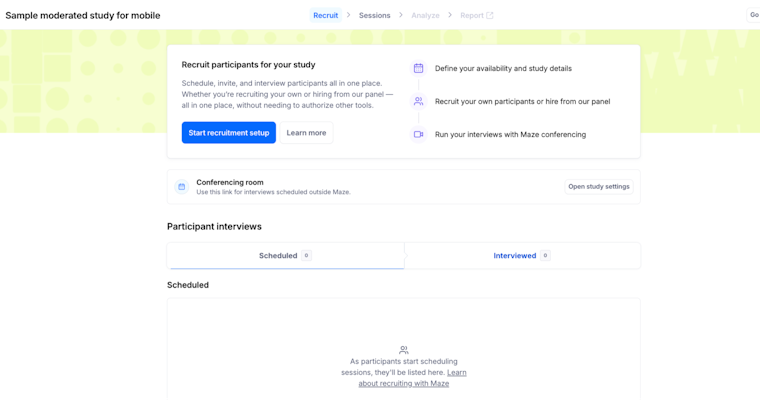
Step 2: Set up recruitment and scheduling
Next, configure how participants will be invited and booked in.
In the recruitment settings, you connect your calendar or define specific time windows so Maze can show only the slots you want to offer. You can set limits for the total number of sessions and how many you want to run per day, and add a short screener if you need to qualify people before they book—especially useful when you’re recruiting via a panel.
When this is ready, Maze gives you a recruitment link that you can share through your own channels, in-product prompts, or panel providers.

Step 3: Choose your video conferencing setup
You then decide how you’ll meet participants. Maze lets you use its built-in video conferencing or connect external tools like Zoom, Google Meet, or Microsoft Teams, and it automatically includes the right meeting link in each participant’s invitation.
At this point, you can also choose whether to record sessions. Turning on automatic recording is recommended if you want transcripts and highlights generated for you after the call.
Step 4: Run and capture your sessions
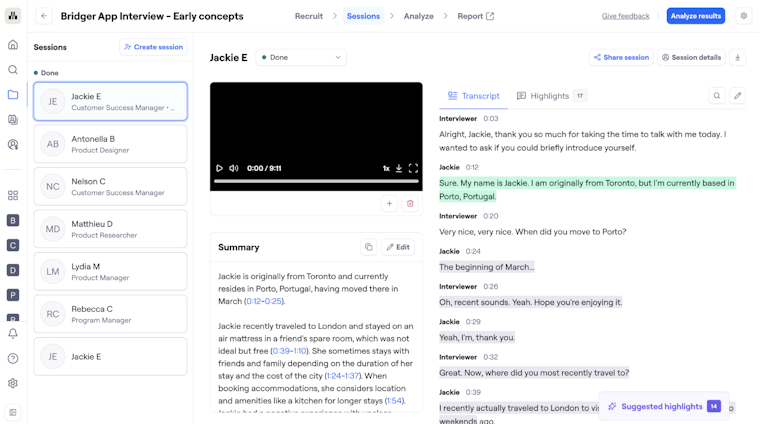
As people start to book, upcoming interviews appear in your study’s sessions (the individual scheduled interview calls for that study) or the Recruit view. You join each call from Maze, greet the participant, and follow your discussion guide, while observers can quietly watch without being on stage with the participant.
And if you’ve enabled recording, you don’t need to worry about detailed note-taking during the conversation—Maze captures the session for you to review later.
Step 5: Organize your research data
Once sessions are complete, you’ll find recordings and transcripts in the study’s Session area. From there, you can review each conversation, clean up any transcript errors that matter, and save key moments for later analysis. Maze AI automatically generates transcripts, summaries, and highlights, reducing the manual work after each interview.

How to create an AI-moderated study in Maze
Creating an AI-moderated study follows a guided, step-by-step flow designed to help you define strong research goals, even if you’re starting from scratch.
Step 1: Start a new AI-moderated study
From your project dashboard, select Create new study → AI-moderated. You’ll be prompted to choose a structure:
- Guided setup (recommended): Ideal if you want help shaping your research plan
- Custom: Best if you already have clear goals and questions defined
You can also adjust language preferences by setting participation language (what language participants speak) and analysis language (what language insights are synthesized in).
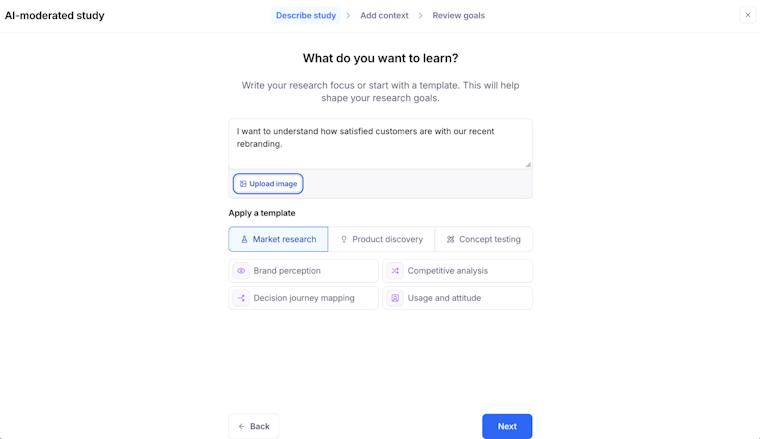
Step 2: Describe what you want to learn
Next, you’ll define your research focus by:
- Writing your own research prompt in plain language (example: “I want to understand how customers feel about expanding beyond our core product")
- Applying a template, such as Problem discovery, Problem validation, or Customer voice
This input is used to generate your initial research goals.

Step 3: Add context to guide AI moderator
Context helps the AI moderator ask smarter, more relevant follow-up questions. You can add:
- About the company: Background on your business, audience, or market
- Product or feature context: What you’re building, testing, or considering
- Assumptions, hypotheses, or open questions: Knowledge gaps you want the study to address
The more relevant context you provide, the more tailored the conversation guide will be.
Step 4: Review and refine research goals
Maze generates a set of research goals based on your inputs. These goals become the backbone of the AI-led conversation. You can:
- Edit goal wording
- Remove goals that aren’t relevant
- Add new goals as needed
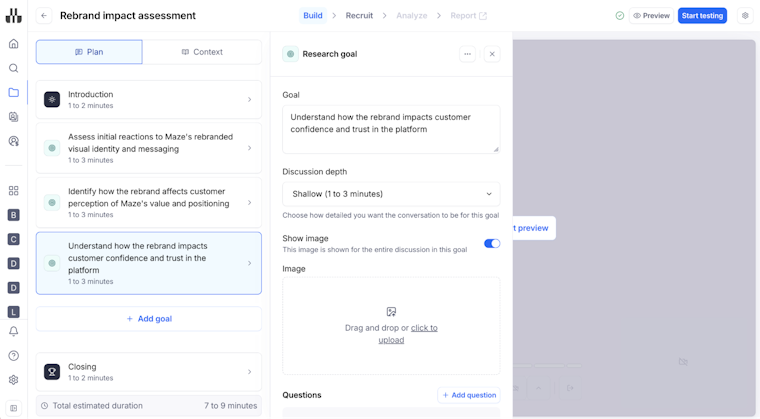
Each goal becomes a section in the interview plan, with time estimates to help manage study length.

Step 5: Build and preview the conversation
Once your goals are set, Maze creates a structured interview plan that includes:
- An introduction
- AI-generated questions tied to each goal
- Natural follow-ups based on participant responses
- A closing section
You can preview the study to experience the AI moderator exactly as participants will—listening to how questions are asked and how the conversation flows.
Interview analysis and reporting with Maze
After each moderated or AI-moderated interview, Maze helps teams review what happened, extract evidence, and package the findings in a format stakeholders can understand and use. Across both study types, Maze AI can generate transcripts, summaries, and suggested highlights, which gives teams a faster starting point for analysis.
From there, researchers can review sessions, group highlights into themes, and build a clearer picture of what participants said across interviews.
In moderated studies, your team usually takes a more hands-on role in deciding which highlights to keep, how to name themes, and how to shape the story.
In AI-moderated studies, Maze can identify theme clusters and sentiment across sessions, giving you more structure upfront. Either way, you review the output, edit, and refine it before sharing it widely.

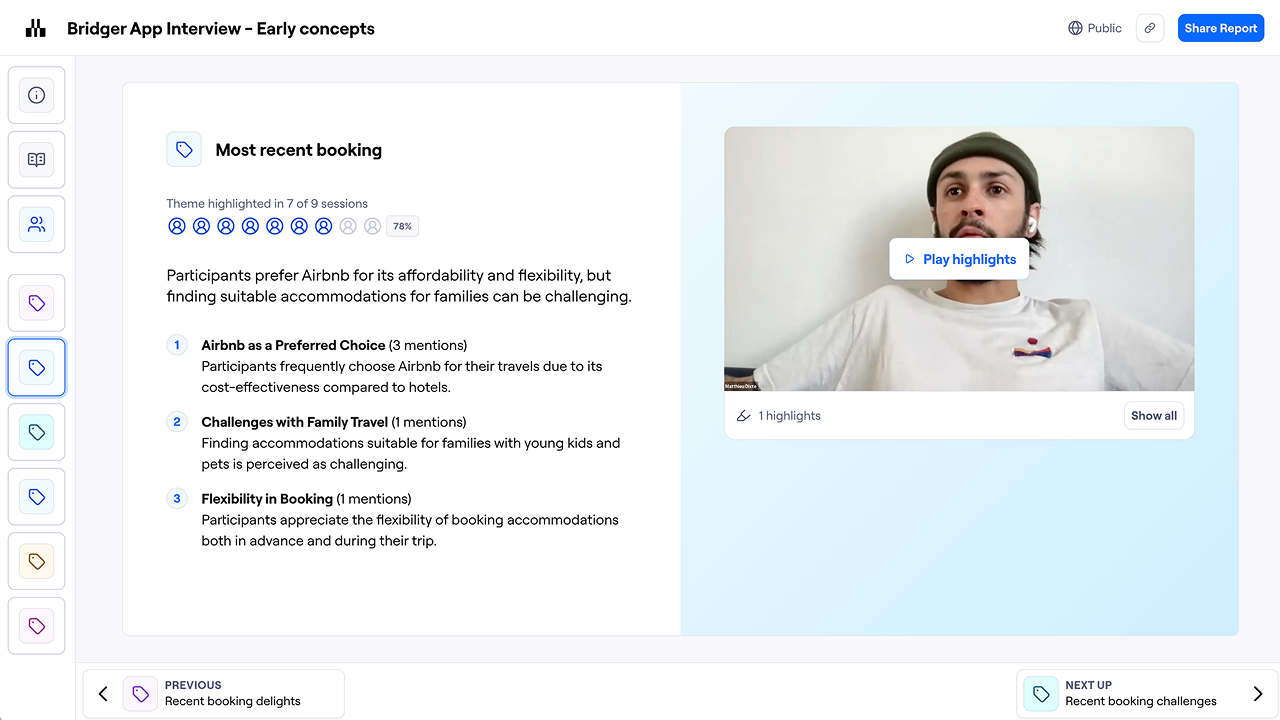
Once findings are organized, teams can use Maze’s automatically generated reports to present them to stakeholders. These reports include an executive summary, participant-level views, and theme slides built from highlights and key findings. Researchers can edit summaries, refine findings, adjust highlights, and hide themes they do not want to include in the final report.
Maze also lets teams share findings at different levels. You can share the full report, a specific report slide, or individual pieces of evidence such as themes, highlights, sessions, and highlight reels.
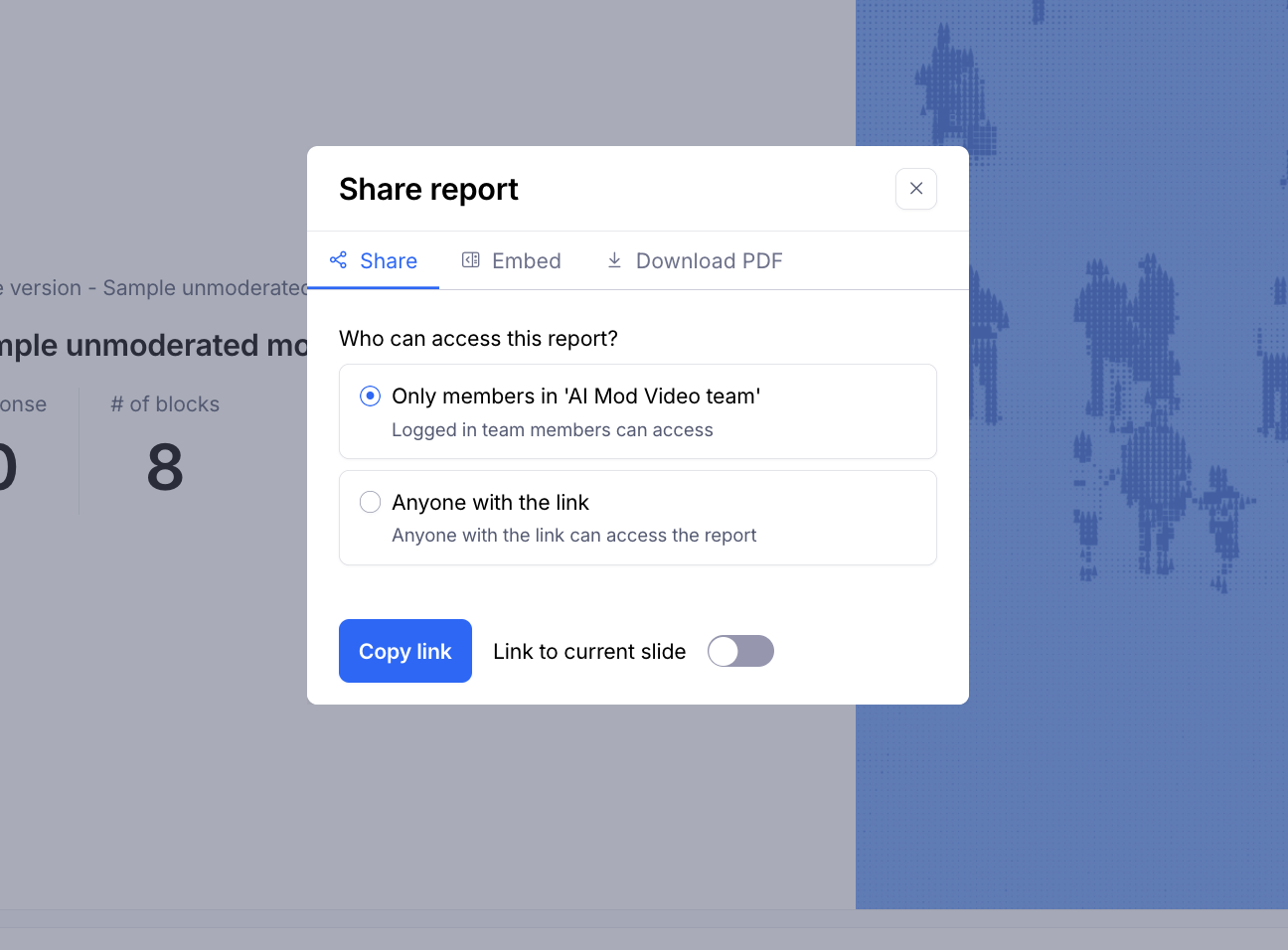
To share a full report or a specific slide, open the report and click Share report to copy the share link. You can also copy an embed link to view the report in another tool. Report links can be private, so only authenticated team members can access them, or public, so anyone with the link can view them. Highlight reels can also be shared by link or embed, or downloaded as video files.

That makes reporting much easier for teams that need to socialize insights across product, design, and leadership.
Up next: Analyzing your Maze study results
Now that you’ve set up and run your studies, the next step is understanding what the results are telling you. In the next chapter, we look at how to read Maze reports—across metrics, open-ended responses, themes, and highlight clips—so you can turn raw data into actionable insights for your team.